Airport Flip Clock · split-flap clock

Flip clock online: an airport board for any screen

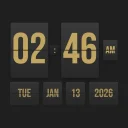
Big split-flap digits that flip like an old departure board, with the date underneath. Switch to a countdown timer, or a world clock where the hours cascade and the city name flips in letter by letter. Full screen, and the buttons fade away.

5 days free · no credit card required. Already have an account? Sign in and open it.

  • Clock · Timer · World clock
  • Full screen, auto-hiding buttons
  • Your own text in flaps
Real app, real taps. Nothing mocked up.

The problem

A spare screen deserves better than a lock screen

That old tablet in a drawer, the second monitor, the TV in the studio: they could show the time beautifully. Real split-flap clocks cost a lot and do one thing. Screensaver clocks are often covered in ads or need an install.

Who it is for

  • Desk setup fans who want a calm clock on a second screen
  • Remote teams who need the time in three cities at a glance
  • Teachers and streamers who need a big countdown everyone can read
  • Anyone who misses the clatter of an airport departure board

Before

  • A tiny clock in the corner
  • Mental maths for time zones
  • A timer only you can see

With Airport Flip Clock

  • Huge flipping digits, full screen
  • Cities that rotate on their own
  • A countdown the whole room can read

How it works

Three steps, right in your browser

  1. 1

    Open it on any screen

    Computer, tablet or phone. On a phone in portrait, hours, minutes and seconds stack as three big flaps.

  2. 2

    Pick a mode

    Clock with date, countdown timer with an alarm, or world clock with up to five cities that rotate every 5 to 60 seconds.

  3. 3

    Go full screen

    Set the text colour, seconds, date and separators, add your own text row, then go full screen. The buttons fade when idle.

What is inside

Everything Airport Flip Clock does

  • Real split-flap motion

    Hours, minutes and seconds flip in 3D, with AM/PM or 24 h.

  • Flipping date

    Weekday, month, day and year on their own row.

  • Countdown timer

    Start, stop, reset, with an alarm that rings for 1 to 60 seconds.

  • World clock

    Up to five cities with hour offsets, rotating every 5 to 60 seconds.

  • Your own text

    A row of letter flaps above the clock or below the date.

  • Make it yours

    Text colour, show or hide seconds, clock or date, blinking separators.

  • Fullscreen

    Buttons fade when idle for a clean display. Settings are remembered.

  • Any screen

    Any screen with a modern browser: computer, tablet or phone.

An airport board for any screen.

Airport Flip Clock runs in your browser on a phone, tablet or computer. Nothing to install.

5 days free · no credit card required.

FAQ

Questions people ask

What is a split-flap display?

Split-flap displays, also called Solari boards, were used in airports and train stations before digital screens. Each character is printed on two halves that flip to reveal the next one, with that well-known mechanical motion.

Can I use it as a screensaver or desk clock?

Yes. Open it on a spare tablet or a second monitor and go full screen. The buttons fade when you are not using them, so only the clock shows.

Does the timer have an alarm?

Yes. The countdown timer plays an alarm sound when it reaches zero. You can start, stop and reset it.

How does the world clock work?

Add up to five cities with their hour offsets. The clock rotates between them every 5 to 60 seconds; the hours cascade to the new city’s time and the city name flips in letter by letter. It starts with New York, London and Tokyo, which you can rename or remove.

Can I add my own text to the flip clock?

Yes. A custom text row in letter flaps can sit above the clock or below the date, for a welcome message, a studio name or a countdown title.

Does it show 24-hour time?

Yes. Choose AM/PM or 24-hour time, and show or hide the seconds.

Will it keep my settings?

Yes. Your mode, colours, cities and text are saved in your browser on that device.

Does it work on a phone?

Yes. In portrait, the hours, minutes and seconds stack as three big flaps; in landscape they sit side by side.

Does it make the clicking sound?

No. The flips are silent, so the clock stays quiet on your desk. Only the countdown timer has a sound: an alarm at zero that rings for as long as you set, from 1 to 60 seconds.

Airport Flip ClockTry it free