How do I put a clock with the weather on my TV?
Open Weather Clock in your TV’s web browser (or on a tablet or laptop connected to the TV), allow location or pick a city, and switch to fullscreen.
Does Weather Clock work on my smart TV?
Yes, in the TV’s browser, or cast it from another device. The large display is made to be read from across the room.
How does the dial show sunrise and sunset?
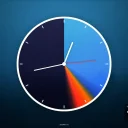
The 12-hour dial is painted as a sky ring: night, sunrise glow, daylight and sunset are placed at the real sunrise and sunset times for your location.
How accurate is the weather?
With location allowed, the app uses your location and a public weather data service to choose the background and show current conditions and a short forecast. Accuracy depends on the data provider and your location.
What is sent when I allow location?
Your approximate location goes to the weather and sunrise services to fetch the data for your area. If you decline, the app makes an approximate guess instead.
Does it show a forecast?
Yes, a strip with icons and temperatures for the next six hours.
Can I change how the clock looks?
Yes: line, number or Roman markers, light or dark hands, and fullscreen mode.
Does it work as a screensaver on a computer?
Open it in a browser window and go full screen on a spare monitor. It is a web page, not an installed screensaver.