Teach Music for Kids · rainbow piano

Learn music notes: every note has an animal

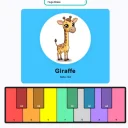
A rainbow keyboard where each note has its own colour and an animal whose name starts with the note letter. C is for Cat, D is for Dog, E is for Elephant. Kids play, hear the chord names, then earn stars in a five-level quiz.

5 days free · no credit card required. Already have an account? Sign in and open it.

  • A colour + animal per note
  • Quiz: 5 levels with stars
  • Touch, keyboard or MIDI
Real app, real taps. Nothing mocked up.

The problem

Note names are abstract for a five-year-old

C, D and E mean nothing to a small child, and flash cards get boring fast. Kids learn best when sounds, colours and stories go together, and when they can play on their own without an adult turning the pages.

Who it is for

  • Parents of children roughly 3 to 8 who are curious about the piano
  • Music teachers who want a colourful warm-up or a quiz for class
  • Homeschool families adding music to the week
  • Older beginners who like learning with colours

Before

  • Letters that mean nothing yet
  • Flash cards and drills
  • A parent needed for every step

With Teach Music for Kids

  • C is a Cat, E is an Elephant
  • A game with stars to earn
  • Kids play and explore alone

How it works

Three steps, right in your browser

  1. 1

    Play the rainbow keys

    Each key lights its colour and shows its animal and note. Press several and it names the chord, like C Major.

  2. 2

    Explore the sounds

    16 sound presets, letter or solfège names (Do Re Mi) and a MIDI keyboard if you have one.

  3. 3

    Take the quiz

    Five levels of eight questions, from three notes to all twelve. Hear a note, pick the animal, earn up to three stars.

What is inside

Everything Teach Music for Kids does

  • Colour-coded notes

    A rainbow octave, C to B with the sharps.

  • An animal per note

    Cat, Dog, Elephant, Frog, Giraffe, Ant, Bee, and friends for the sharps.

  • Quiz with stars

    Five levels of eight questions; two stars unlock the next level.

  • Chord names

    Hold several keys and see the chord, like C Major.

  • 16 sound presets

    From piano and pads to Huge Brass and Glass Drops.

  • Letters or solfège

    C D E or Do Re Mi, whichever your child learns at school.

  • Touch, keys or MIDI

    Tap the screen, use the computer keyboard or plug in a MIDI keyboard.

  • For teachers too

    An option unlocks all quiz levels for class.

Every note has an animal.

Teach Music for Kids runs in your browser on a phone, tablet or computer. Nothing to install.

5 days free · no credit card required.

FAQ

Questions people ask

How do you teach music notes to kids?

Start with sounds and pictures before letters. Linking each note to a colour and an animal (C is for Cat, D is for Dog) gives small children something to remember, and a short quiz with stars turns practice into a game.

What ages is it for?

It is aimed at young children, roughly ages 3 to 8, with a parent helping the youngest. Older kids who are musical beginners can enjoy it too.

Do kids need to know any music first?

No. The colour and animal for each note make it easy for complete beginners to start.

How does the quiz work?

Switch from Play to Quiz. There are five levels of eight questions: Three Friends (C, E and G), Match the Animal, All the White Keys, Listen Closely and Sharps and Flats. A wrong answer greys out the card and replays the note for a second try, and each level ends with one to three stars. Two stars unlock the next level.

Which animal goes with each note?

C Cat, D Dog, E Elephant, F Frog, G Giraffe, A Ant and B Bee. The sharps have their own: Chameleon, Dolphin, Fish, Goat and Albatross.

Can I use a real keyboard?

Yes. Plug a MIDI keyboard into a computer and play it, or use the computer keys. On a tablet or phone, kids simply tap the rainbow keys.

Does it use solfège (Do Re Mi)?

Yes. Switch between letter names (C D E) and solfège names (Do Re Mi).

Is it a full piano course?

No. It is a play and discovery toy with a practice quiz, not a graded course. It is a friendly first step before lessons, or alongside them.

What language is it in?

The app is in English.

Teach Music for KidsTry it free