How can I practise handwriting online?
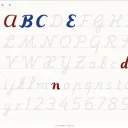
Type the words you want to practise, choose a handwriting or calligraphy script and trace the faint models on the lined paper with a stylus, finger or mouse. When you prefer paper, print a worksheet.
Can I learn calligraphy on an iPad?
Yes. Use an iPad with Apple Pencil: the pen follows pressure, so pressing harder on downstrokes gives the thick-and-thin look of brush calligraphy. Pressure support depends on your browser and device.
Can I print practice sheets?
Yes. Choose Print practice worksheet, pick A4 or US Letter, the nib width, x-height, slant and number of blank rows, and type the letters or words to trace. Print or save as PDF from your browser.
Is there left-handed support?
Yes. Left-handed mode makes the slant guides lean the other way, adds downstroke arrows that follow the slant and moves the sidebar and toolbars to the right.
Which fonts can I trace?
Dozens of handwriting and calligraphy fonts, from brush scripts such as Alex Brush, Pacifico, Tangerine and Parisienne to school handwriting styles.
Does Scribe work on tablets?
Yes, with a stylus on an iPad or an Android tablet, or with your finger.
Can I practise the whole alphabet?
Yes. The A–Z button fills the models with the alphabet.
Is my work saved?
Your page autosaves in the browser, and you can save it as a PNG.