Fasting Tracker · intermittent fasting timer

Intermittent fasting tracker: see every stage, live

Start the timer when you finish eating. A ring shows how far you are into your 16:8 (or 12:12 up to OMAD), and a guide explains what is probably happening in your body right now, with an honest label on how sure the science is and links to the studies.

Free 360apps account · no credit card required. Already have an account? Sign in and open it.

  • 12:12 to OMAD + custom
  • Sources and certainty labels
  • PDF or CSV for your doctor
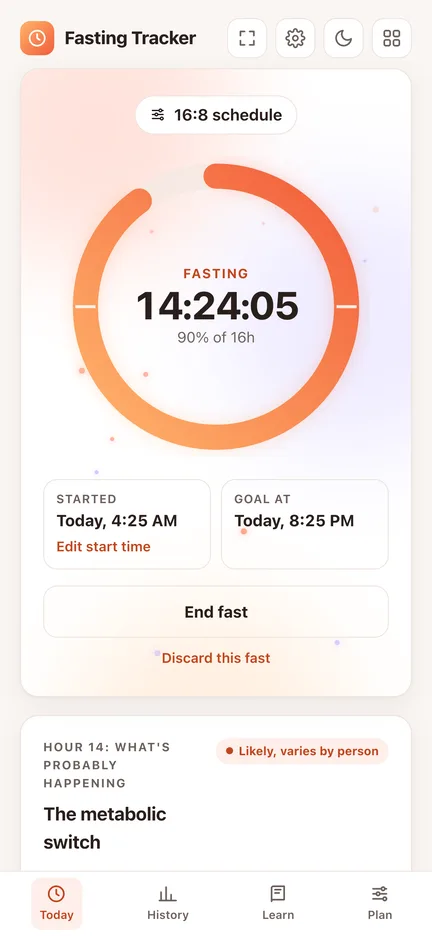
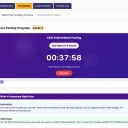
Fasting Tracker on a phone, 14 hours 24 minutes into a 16:8 fast, 90 percent of the goal
A real screen from the app. Nothing mocked up.

The problem

Most fasting apps sell you hype

Autophagy at hour 16, fat-burning switches at an exact minute, streaks that punish a missed day. Fasting is simpler and less certain than that, and the apps that promise more usually want a subscription. You need a clear timer and an honest guide.

Who it is for

  • Beginners trying 12:12 or 14:10 before 16:8
  • People doing 16:8, 18:6 or OMAD who want a clean timer and history
  • Anyone who wants to know what the research actually says
  • People who want to share a PDF or CSV log with their doctor

Before

  • Guessing how long you have fasted
  • Myths dressed up as facts
  • Logs scattered across notes

With Fasting Tracker

  • A live ring and the exact time left
  • Each step labelled solid, likely or unclear
  • Streaks, a 14-day chart and exports

How it works

Three steps, right in your browser

  1. 1

    Pick a schedule

    12:12, 14:10, 16:8, 18:6, 20:4, OMAD or a custom length. A short quiz suggests a gentle starting point.

  2. 2

    Start when you finish eating

    The ring fills as you fast. Forgot to start? Set the start time, or add a past fast later.

  3. 3

    Read, end, review

    See what is probably happening hour by hour, end the fast, then check streaks, averages and the 14-day chart.

What is inside

Everything Fasting Tracker does

  • Fasting timer with a ring

    12:12, 14:10, 16:8, 18:6, 20:4, OMAD and custom 12 to 23 hours.

  • Hour-by-hour guide

    What is probably happening, with sources and certainty labels.

  • History

    Streaks, averages, a 14-day chart and milestones.

  • Fix any fast

    Edit start times, edit logged fasts, add one you forgot.

  • PDF and CSV

    Export a report or a spreadsheet, or a full backup.

  • Reminders

    Goal and water reminders while the app is open in a tab.

  • Stays on your device

    Nothing is uploaded. Works offline once loaded.

  • Dark mode

    Easy on the eyes at night, on phone or computer.

See every stage, live.

Fasting Tracker runs in your browser on a phone, tablet or computer. Nothing to install.

Free 360apps account · no credit card required.

FAQ

Questions people ask

What is the best app to track intermittent fasting?

One that shows clearly how long you have fasted, lets you fix mistakes and does not oversell the science. Fasting Tracker has a live timer for common schedules, an hour-by-hour guide with sources and certainty labels, and a history you can export.

Which fasting schedules can I use?

12:12, 14:10, 16:8, 18:6, 20:4 and OMAD (23:1), or any custom length from 12 to 23 hours. 24-hour and 36-hour fasts are available too, with a reminder to check with a doctor first. The short quiz in the Plan tab suggests a gentle schedule.

What happens to your body during a 16 hour fast?

In the first hours you digest your last meal, then the body runs on stored sugar. Somewhere beyond about 12 hours many people start using more fat and making small amounts of ketones, but when it happens depends on your last meal and how active you were. The app explains each step and how certain the research is.

Does autophagy start at 16 hours?

That claim is popular but not proven in people. The app labels it as a myth and explains what is actually known.

I forgot to start the timer. Can I fix it?

Yes. You can set the start time of the current fast, edit any logged fast and add a past fast you forgot to log.

Will I get notifications when my fast is over?

The app can show a browser notification when you reach your goal and remind you to drink water, as long as the app is open in a browser tab. It cannot send push notifications while it is closed.

Where is my data stored?

Only on your device, in your browser. Nothing is uploaded. You can export a PDF report, a CSV file or a full backup at any time.

Is Fasting Tracker medical advice?

No. It is a timer and an educational guide. Fasting is not suitable for everyone. Check with a doctor first if you have diabetes, take medication, are pregnant or breastfeeding, or have a history of eating disorders, and stop and seek help if you feel unwell.

Where do the health explanations come from?

From peer-reviewed research and major medical sources, such as the New England Journal of Medicine, Obesity and Johns Hopkins Medicine. Each explanation links to its sources.

Fasting TrackerStart free