

Description
trending
Spadio Hub
Play, monitor, and convert Dolby Atmos ADM BWF and Ambisonics files with AirPods head tracking.
“Play, monitor with head tracking, and convert any 3D spatial audio master without opening a DAW.”
About Spadio Hub
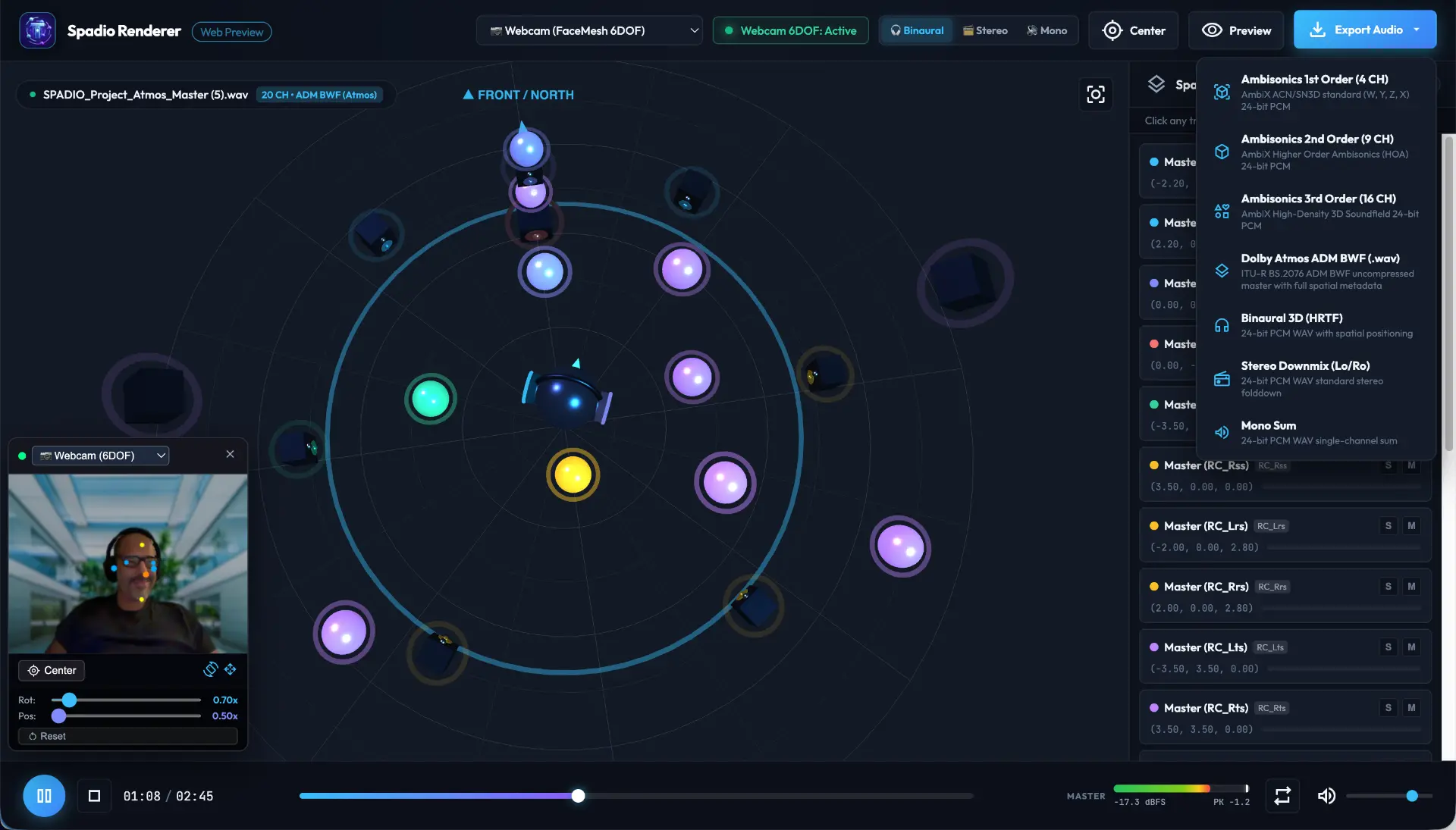
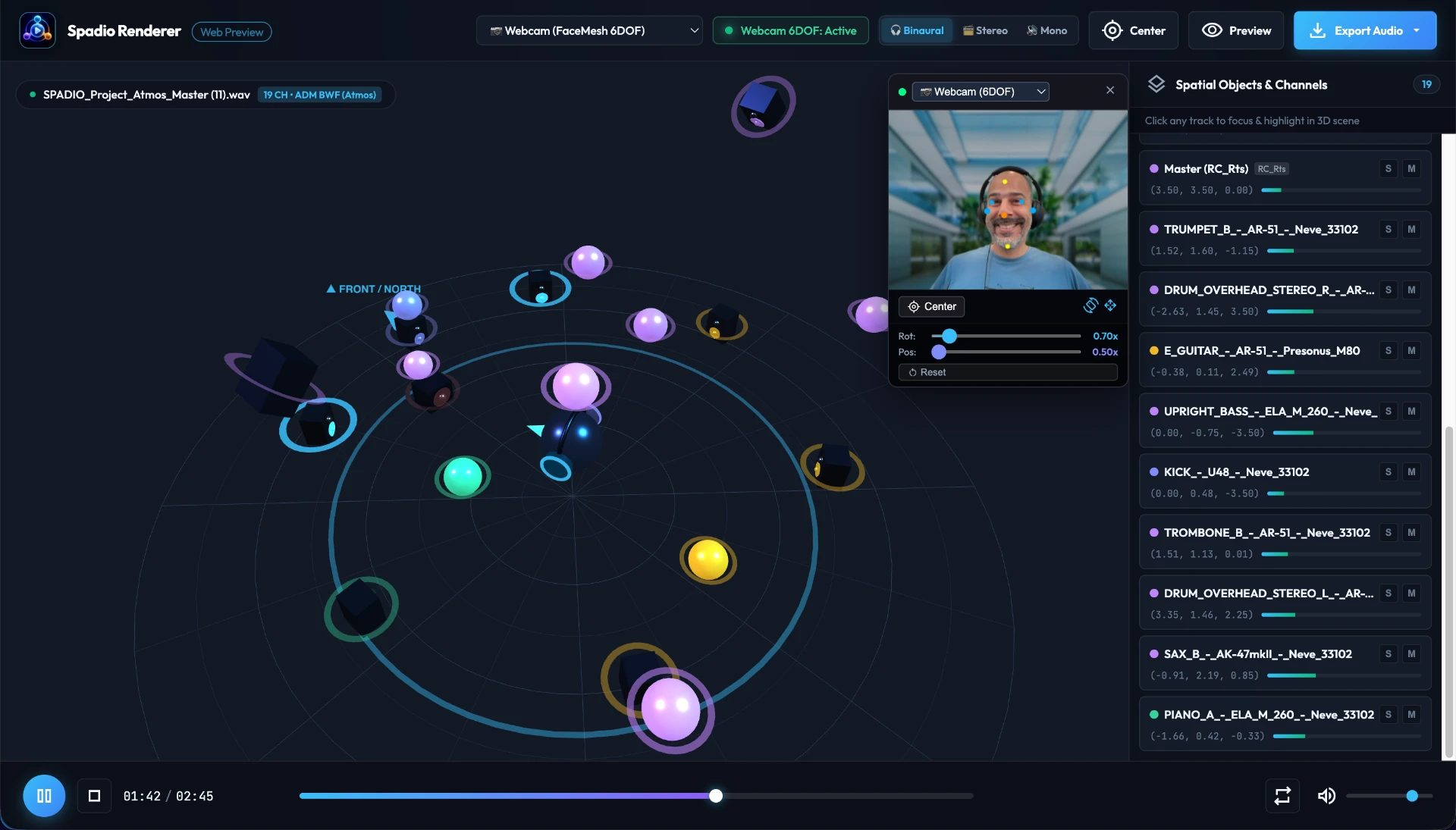
Spadio Hub is the dedicated spatial audio player, monitor, and format converter for audio engineers, producers, and game developers. Drag and drop Dolby Atmos ADM BWF masters, Ambisonics, and multichannel audio files for instantaneous playback without launching heavy DAWs. Monitor in real time with hardware head tracking via Apple AirPods (CoreMotion), Bluetooth BLE headsets (Bose QC Ultra, Sony), or Webcam FaceMesh 6DOF with live Picture-in-Picture. Inspect 3D spatial object coordinates and dynamic channel meters, check stereo folddowns (Lo/Ro) and summed mono compatibility, and export with 1 click to Ambisonics (1st, 2nd, 3rd Order AmbiX), Dolby Atmos ADM BWF, or Binaural 3D HRTF.
people
Product Highlights
1
Dolby Atmos ADM BWF Player & Converter
2
Apple AirPods CoreMotion Head Tracking
3
Bluetooth BLE Headset Tracking
4
Webcam FaceMesh 6DOF Head Tracking with PiP
5
Interactive 3D Visual Soundstage
6
Real-Time Spatial Objects & Channel Inspector
7
Binaural / Stereo Lo/Ro / Summed Mono Modes
8
1-Click Ambisonics (1st to 3rd Order) & ADM Export
lightbulb Problems This Solves
arrow_right
Auditioning Dolby Atmos ADM BWF files requires launching heavy, complex DAWs or expensive dedicated hardware renderers
arrow_right
Monitoring spatial audio with real-time head tracking on PC/Mac typically requires complicated audio routing and virtual drivers
arrow_right
Converting spatial formats between Dolby Atmos and Ambisonics usually involves confusing command-line tools
arrow_right
Quickly verifying stereo folddown (Lo/Ro) and mono phase cancellation on spatial masters is tedious and error-prone
verified Key Benefits
check_circle
Instant Drag & Drop Playback: Load Dolby Atmos ADM BWF and multichannel audio files instantly
check_circle
Zero DAW Overhead: Fast, standalone application that avoids CPU hogging and lengthy DAW project loads
check_circle
Real-Time Hardware Head Tracking: Full support for Apple AirPods (CoreMotion), Bluetooth BLE, and Webcam FaceMesh 6DOF
check_circle
Live 3D Soundstage Visualizer: Interactive Three.js 3D stage with orbit, pan, zoom, and spatial audio object positioning
check_circle
Spatial Object & Channel Inspector: View real-time level meters, dynamic XYZ coordinates, and isolate individual spatial objects
check_circle
Essential Monitoring Modes: Instant toggling between Binaural 3D (HRTF + Head Tracking), Stereo Downmix (ITU-R Lo/Ro), and Summed Mono
check_circle
Universal 1-Click Format Conversion: Export to 1st, 2nd, 3rd Order AmbiX Ambisonics, and ADM BWF
check_circle
100% Private & Offline: Audio files and proprietary spatial metadata are processed entirely on your local machine
Gallery
help_outline Frequently Asked
Questions
Only logged in customers who have purchased this product may leave a review.


Reviews
There are no reviews yet.