
 Camera Playground
No queue for the lights
Every student shapes key, fill and rim light with softboxes, beauty dishes, strip boxes and gels in their own studio, at the same time.
Camera Playground gives each student their own 3D studio and photography park, with real cameras, lenses and lights, 64 lessons where guides grade every photo, and a final exam. You create the class, students join with a code, and you see who has done what.
Pilots and quotes by e-mail · no card needed · students need no e-mail address
Light, exposure and lenses are learned by doing, and doing needs a studio, a camera per student and time. Camera Playground puts a private studio on every student's screen, so practice no longer waits for the one kit.
Every student shapes key, fill and rim light with softboxes, beauty dishes, strip boxes and gels in their own studio, at the same time.
Guides in the app give real-life briefs, show how with "Show me" and grade each photo, so students are not waiting for you to check their screen.
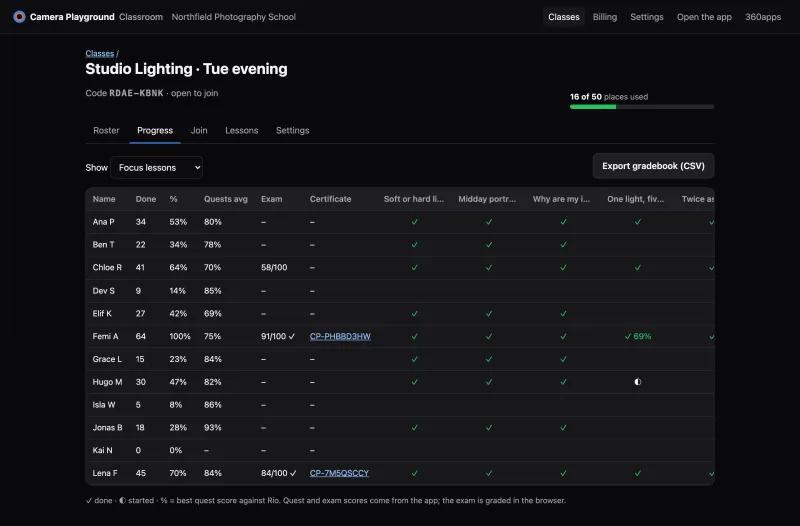
Lessons done, quest scores and exam results land in your progress grid and export to your gradebook as a CSV.
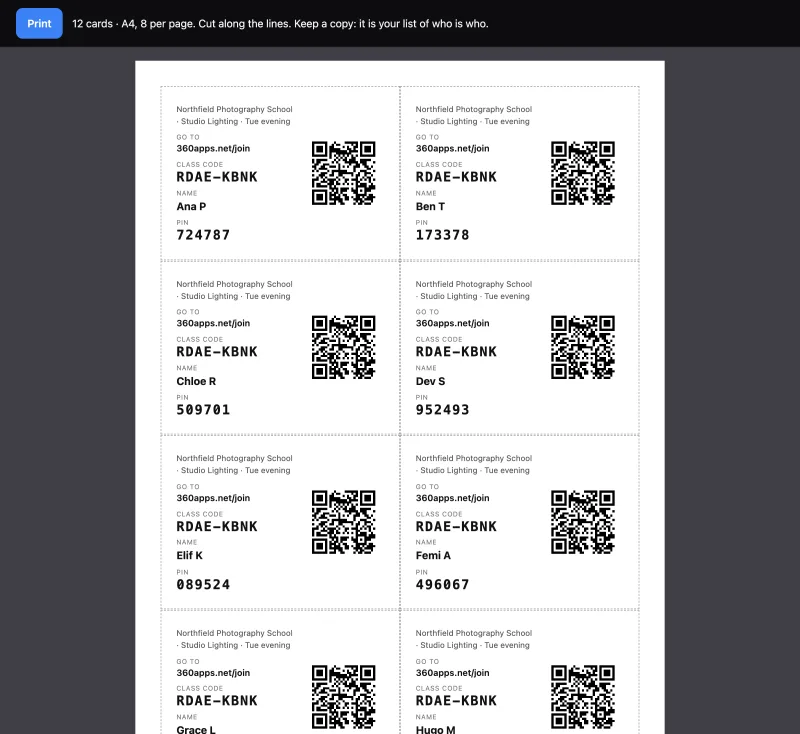
Name it, get a join code, a link and a QR code. Print login cards in one click, eight to an A4 page.
Class code, a name and a PIN. No student e-mail, no app to install, no Google or Microsoft account.
Pick focus lessons, post lesson links in your LMS, follow the progress grid and export a CSV for your gradebook.
These are the real classroom pages, with a demo class and invented names. Your classes, codes and students appear in the same places.
A bar shows how many of your places are in use. A student counts once, however many of your classes they are in.
Open joining lets students type a name and get a PIN; it closes by itself after 14 days. Roster mode lets in only the students you added.
Eight to a page, with the class code, the student's name, a PIN and a QR code. Write a real name on the card by hand if you need to: we don't need it.
On any device with a modern browser. The page tells them what the teacher sees and that their photos stay on their device.
Ticks for lessons done, the best quest score against Rio, the exam result and the certificate. Filter by track or your focus lessons; export to CSV.
Choose the lessons for this term: students see them first under "From your teacher". Copy a lesson link, or share it to Google Classroom.
Switch certificates on per class. In adult classes each certificate has a public verification page; for 13–17 classes it is printable only.
Add students one by one or paste a list. Show a forgotten PIN, unlock a student, rename, move or remove them.
Screens from the classroom pages (October 2026), demo class, invented names. The teacher pages and the teacher kit are in English; the app itself speaks 14 languages.
Students sign in with a class code, a name and a PIN. For 13–17 classes we suggest first name and initial, or a pseudonym like "Blue Fox 12".
The pictures students take are kept in their own browser, not on our server.
The pages students use load no advertising, analytics or social scripts. We don't sell student data or use it to train AI.
Remove a student, a class or your whole organisation at any time. When a licence ends you have 90 days to export, then the data is deleted.
Your school stays in charge of the data; we process it for you under a Data Processing Agreement (GDPR Art. 28).
Classes with younger students only with an agreement signed by the school first.
Our Data Processing Agreement, privacy notice for schools and list of sub-processors come with your quote. Ask for them in the form below.
Every plan has the full simulator, all 64 lessons, quests, the exam, the progress grid, CSV export and certificates. Tell us about your school or course and we send a quote, with an invoice and purchase order if you need them.
One class, one term
Price on request
One teacher, up to 50 students
Price on request
Several teachers, up to 250 students
Price on request
Adult courses, priced per student
Price on request
A licence for the Mac app on lab computers can be added to a quote. Individual learners use Camera Playground on its own page. See the page for individuals →
One PDF with everything to run your first lessons: set-up, a device check for your school network, three 45–60 minute lesson plans with exit tickets, a standards map (AQA, NCAS Media Arts, MBO) and support.
Download the teacher kitPDF · 21 pages · 657 KB · English · also in Spanish
Tell us about your school or course. We reply by e-mail with a pilot for your class or a quote you can send to purchasing.

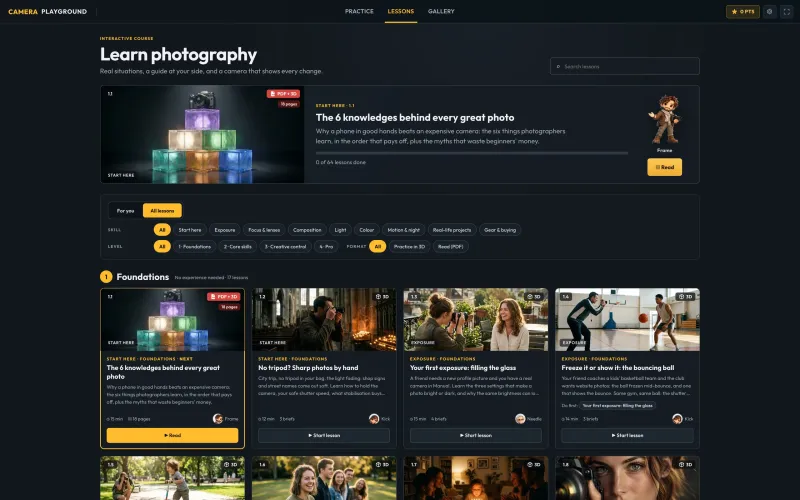
Both. It is a 3D photography simulator, with studios, a park and labs with real cameras, lenses and lights, and a course built in: 64 lessons in 9 tracks, quests and a final exam. Follow the course order or pick focus lessons that fit your own scheme of work.
No installation. It runs in a browser with WebGL 2 (current Chrome, Edge or Firefox, or Safari 16.4 and newer) on laptops, desktops, tablets and phones; laptops and desktops work best. School Chromebooks and older laptops vary, so run the device check from the teacher kit on your own devices and network before the first class. The first visit downloads the 3D scenes, which are cached afterwards.
No. You create the class; students join with the class code, a name and a PIN. Teachers use a normal 360apps.net account.
We store a name, an encrypted PIN, class membership and learning progress (plus the name for a certificate if a student prints one). Photos stay on the student's device. The pages students use load no ads or trackers. Your school stays in charge of the data, and we process it on its behalf under a Data Processing Agreement (GDPR Art. 28), which comes with your quote. Students must be 13 or older; younger classes need an agreement signed by the school first.
Yes, through links: post the class join link or a lesson link in any LMS, and there is a Share to Google Classroom button. Grades are not sent back automatically: use the CSV export. Single sign-on and LTI are not available yet.
Yes. Ask for a quote in the form, send us your purchase order, and we invoice you. Supplier documents are available on request.
Yes, as a pilot: we set it up by hand for your class for one term. Your classes and progress carry over if you continue.
Photography (GCSE, A-level, vocational and adult courses), media and film studies (lighting, exposure, composition), art and design, and CTE or MBO media programmes. The teacher kit has a standards map for AQA, the US National Core Arts Standards (Media Arts) and the Dutch MBO.
Students can use the photos they make for coursework, portfolios and critiques. Whether simulator images count as assessed work is your exam board's or school's decision; we suggest treating them as practice and planning evidence next to real photographs.
No. A certificate shows that a student completed the Camera Playground course and passed its final exam in the simulator. It names your school or course, the hours and the exam score.
Yes, on the Camera Playground page for individuals. A class licence is simpler for teachers: you see progress, and students need no e-mail.
360apps, a small software company in the Netherlands, with photographer and teacher Daniel Farjoun, who has taught photography online since 2013.
Ask for a pilot for one class, or a quote for your school. We set it up by hand and reply by e-mail.
