
 Camera Playground
Blurry, exactly when it matters.
She laughs, you press the button, and she's a smudge. Again.
 Kick: that's shutter speed. We'll freeze it together.Practise it: Motion Lane, with the duck speed lever
Learn the craft on screen. Live it off screen.
A 3D photography park in your browser, with a course of 64 lessons. Pick up a real camera, a real lens and a real flash, change one setting, take the shot again and see why the photo changed. Then close the app: the photos that matter are out there.
Free 5-day trial, no credit card · then €97 once, every update included · No camera? Start with your phone
Built by the photographer and teacher behind Canal da Foto, the online photography school for beginners from Brazil, teaching since 2013.
It isn't the camera. A good phone and a good camera can make photos nobody can tell apart. Your phone just makes a thousand decisions for you before you tap, and your camera hands them back to you. Learn to make those decisions, and any camera, even the one in your pocket, takes the photo you meant.
She laughs, you press the button, and she's a smudge. Again.
Kick: that's shutter speed. We'll freeze it together.Practise it: Motion Lane, with the duck speed leverThe room looked cosy. The photo looks like it was dipped in tea.
 Roxy: your eyes adjust to colour. Your camera needs telling.Practise it: White Balance Lab, 2,000 K to 7,000 K
The sky is perfect and your friend is a black shape. Or the other way round.
 Needle: I measure light, but I'm easy to fool. You'll learn when to overrule me.Practise it: the histogram and the 18% meter
Each place in the park is built around one decision photographers make in real life. Here are five of them, exactly as they look in the app today.
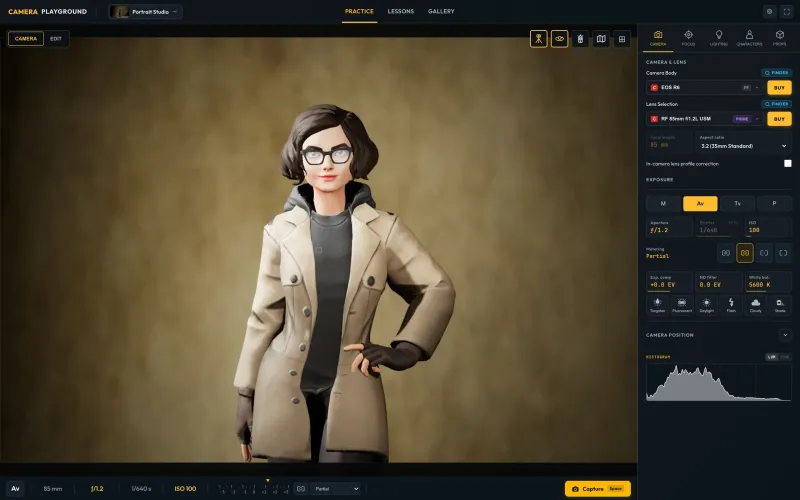
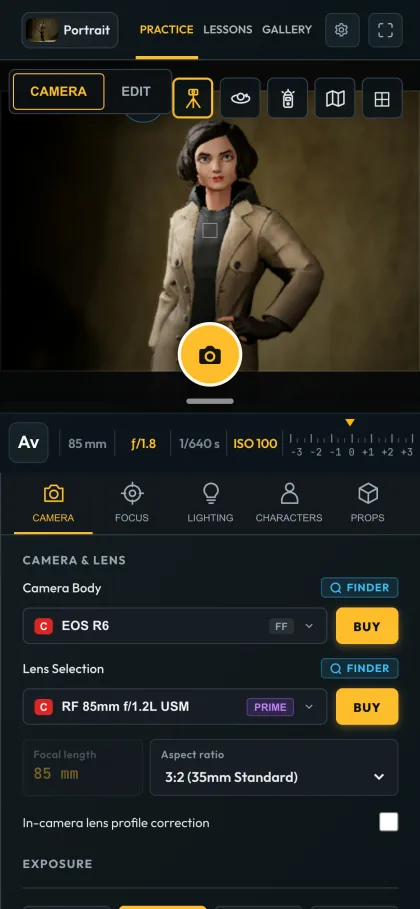
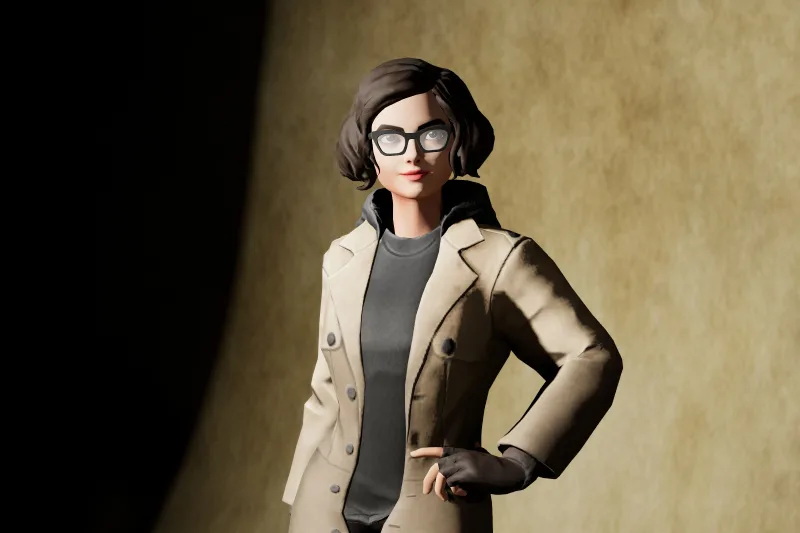
Put an 85 mm lens on, open up to ƒ/1.2 and watch the backdrop soften in the live view. In Av the camera picks the shutter speed for you. Every photo also comes with an overhead lighting diagram of the setup.
85 mm · ƒ/1.2 · 1/640 s · AvSwitch the key light to a real studio flash and measure it at her face with a hand-held light meter. One click sets the aperture. In the Professional preview the viewfinder stays dark until the flash fires, just like in a real studio, so you meter and test.
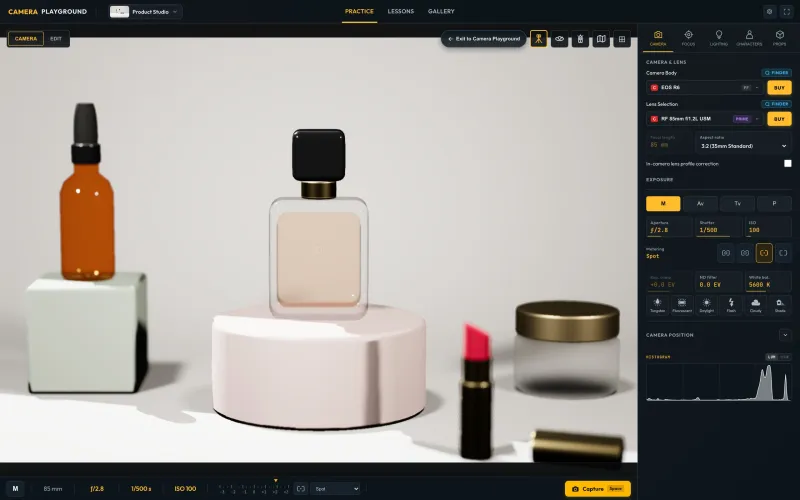
Godox AD600Pro II · the meter reads ƒ/9On the tabletop, click to focus on the bottle that sells and let the lipstick and its cap fall out of focus. Move the light, change the backdrop, compare two versions side by side.
ƒ/2.8 · focus on the perfumeClose the aperture and the shutter follows. Eight seconds turn the Ferris wheel and the carousel into rings of light, because the app really adds up the motion during the exposure. Then ride the wheel and shoot from a gondola.
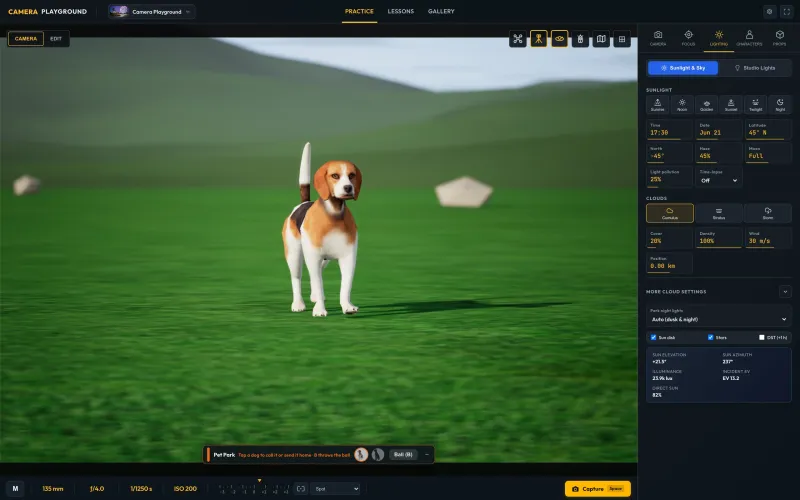
35 mm · ƒ/22 · 8 s · ISO 100 · tripodIn the Pet Park the dogs come when you call them and fetch a ball. Get down to their eye level, pick a fast shutter speed and keep the focus on the eyes.
135 mm · ƒ/4 · 1/1250 s · 55 cm above the grassEvery screenshot and photo on this page is real Camera Playground output from the version online today (English interface). Nothing is mocked up or retouched. Crew portraits and lesson covers were made with the help of AI tools.
A portrait, a product, your dog, the fairground at night. Open the map and fly there, or start the lesson that fits: every place in the park is built around one decision photographers make.
The guide gives you a brief like a client would, shows you on the real controls and checks every frame with real numbers. Every photo lands in your gallery with all its settings. Nobody is watching, nothing is wasted.
Each lesson ends with a field card: the same exercise for your own camera or phone, out in the world. That’s where it starts to count.
Nine tracks and four levels, in an order where each lesson only asks for what the earlier ones taught. 50 lessons are guided on location by the crew, 6 mix a short reading with 3D practice and 8 are illustrated readings. About 16 hours in all, 5 to 35 minutes each. Open a track to see its lessons.
Tell the welcome tour what you want to photograph and how much you know, and your lessons come first. A “continue” card takes you back to where you stopped.
Every lesson starts with a real request. The tasks tick off live while you change the camera, so you see what worked the moment it works.
Stuck? The guide takes the real controls and shows each step, then gives your settings back the way you left them.
The course ends with four client briefs, graded by Rio, your rival, and course tests along the way. Pass them and get a certificate of completion in your name, with a code anyone can check.
Create a free 360apps account and try Camera Playground for 5 days, no credit card. The trial opens a reduced version: the Portrait Studio, the Lens Lab and the Motion Blur Lab, one camera and one phone, and these three lessons.
They talk in short bubbles, dare you to try things and get out of the way when you’re shooting.




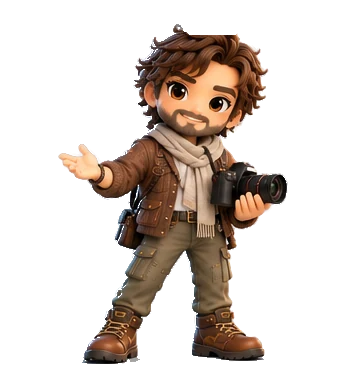

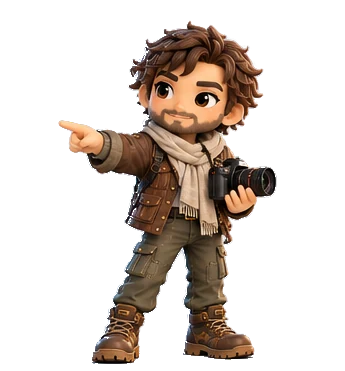
Crew portraits were made with the help of AI tools.
Walk up to a place in the park and its guide is waiting: Frame for composition and lenses, Needle for exposure and the light meter, Volt for studio light and flash, Glow for small and big light, Sol for natural light, Roxy for colour, Kick for motion and Ghost for long exposures. They check every frame with real numbers: how sharp, how bright, how far off.
A studio flash fires for a fraction of a second, too fast for your eye. Camera Playground gives you the tools photographers use to work with it, and three lessons built around them.
Start at Aperture Plaza, open the map and fly anywhere, by day or by night. An outdoor park, two studios and four labs, all in one app.
The map table: pick any place in the park and fly there.
The carousel and the Ferris wheel at night, skaters by day: bulbs become rings of light, tricks freeze mid-air.
Ride a gondola, look around, lean out a little and shoot the park from 20 m up.
Dogs that come when you call and fetch a ball: shoot them at their level, in the sun and in the shade.
Wildlife at a distance: what a long lens does to space.
Painters write with torches in the dark. Leave the shutter open and watch the word appear.
Follow a moving car with the camera: a sharp subject and a streaked world.
Ducks at a speed you set with a lever: freeze them, or let them blur.
Pins at marked distances: see how much is sharp at each aperture, with the sharp zone drawn on the ground.
Same subject, same power: a small flash and a 1 m softbox side by side.
A subject just inside the mouth of a tunnel: soft light from the open sky.
Two rows of palms run to the tunnel: line them up and let them lead the eye.
A raised deck facing the hills: wide angles, layers of landscape and a low sun.
Get close, where focus gets thin and every centimetre counts.
What your light meter sees, and when to trust it.
A paper backdrop, flashes and continuous lights, modifiers, gels, models to pose and studio dogs.
A tabletop sweep with perfume glass, cosmetics and reflections.
One lamp at a time, from a 2,000 K street lamp to 7,000 K shade, over a grey card and a colour chart.
Test charts for sharpness, distortion and vignetting: test a lens before you buy it.
A bouncing ball and a wall of four fans: one shutter speed, four kinds of blur.
Bokeh up close: aperture shape, cat’s-eye, coma and diffraction.
149 camera bodies and phones and 161 lenses, from Micro Four Thirds to medium format and cinema, including Leica M, Leica Q3 and Hasselblad X. The Lens Finder shows only lenses that really fit the body you chose.
Pick your own phone in the simulator and it behaves like it: the same camera modules, the same automatic decisions, the same limits. Learn why your photos look the way they do, and how to make them better, before you spend anything.
Outgrowing your phone? Switch to a camera body in the same scene and see exactly what changes.
Every lesson you rehearse in the simulator is a decision you’ll make again outside, when it counts. Here’s what one week can look like.


Rehearsed on a screen. Kept from a moment that was really there.
Anyone can type a prompt and get a perfect sunset. Nobody can generate the night your friends stayed up until the sky turned pink, the way your grandmother laughed at the table, the street you walked on your last day abroad. Those photos only exist if someone was there, paying attention, ready.
That’s what we teach. Not filters. Not presets. Attention, timing and light: the things decided at the click that can’t be fixed afterwards.
Pick one to see where you’d practise it in the park and which lessons teach it.
“I was afraid of my own camera. I had a DSLR, but I couldn’t get out of automatic mode… The interactive material makes everything clearer and makes you think before you pick up the camera.”
“The quality of my photos improved a lot after I started studying with these courses, and I haven’t even finished them yet.”
“If I didn’t understand something, I could go back as many times as I wanted, without the embarrassment of every other student staring at me.”
Students of the Canal da Foto courses. Camera Playground teaches the same method, by the same teacher, now through practice in the simulator. Translated from Portuguese. canaldafoto.com.br
Real photography is expensive to practise: models get tired, the sun won’t wait, a studio costs money by the hour, and every mistake costs a moment. Here, you can try again.
Move a lamp twice as far away and you lose two stops, just like in real life.
Depth of field and bokeh come from lens optics, not a blur filter.
Skaters, ducks, dogs, a carousel, spinning fans. Blur comes from real movement, the subject’s and your own hand’s.
Sunrise, golden hour, blue hour or night, with clouds, haze and the moon. Long shadows on demand.
Lights, modifiers and a model who never gets tired of one more try. Ten minutes on a lunch break is enough.
The Gallery keeps the EXIF of every shot. Compare two side by side, or restore the scene and the settings and try again.
Full manual control from the first minute: M, Av, Tv and P, ISO, exposure compensation, ND filters, four metering modes, AF-S, AF-C and manual focus, white balance by lamp type or Kelvin, 28 real flashes with TTL and HSS, a light meter, gels, modifiers and lighting diagrams you can export.
No. You practise in Camera Playground, in your browser, with a real camera body or with your own phone’s model. When you go outside to try it for real, any camera works, including the one in your phone.
€97, paid once, plus VAT where it applies (added at checkout). No subscription. Every update is included: new lessons, places and gear arrive as free updates.
Create a free 360apps account and you get 5 days free, no credit card needed. During the trial Camera Playground opens in a reduced version: the Portrait Studio, the Lens Lab and the Motion Blur Lab, one camera body and one phone, a few lenses and the first 3 lessons, with up to 10 photos in the gallery. Buy it once and everything opens: the whole park, all 64 lessons, every camera, lens and flash, the course tests and the certificate.
A whole course: 64 lessons in 9 tracks and 4 levels, from holding the camera to exposure, focus, composition, light, colour, motion and night, real-life projects and buying gear. 50 are guided on location by the crew, each with a Show me demonstration and a quest; 6 combine a short reading with 3D practice; 8 are illustrated readings. About 16 hours in all. It ends with a final exam of four client briefs.
Yes. With the full version, the course tests and the final exam lead to a certificate of completion in your name, with a code anyone can check online.
Yes. There are 28 real flash units, from speedlights to studio packs, in Manual or TTL, with flash exposure compensation, high-speed sync and rear-curtain sync, plus a hand-held light meter, modelling lamps and three light-preview levels (Guided, Studio, Professional). Three lessons are built around them: “Measure your light, don’t guess it”, “TTL or manual? When to trust the flash” and “The lamp is not the flash”.
Yes, in two ways. Inside the app, choose your phone from 42 models by Apple, Samsung, Google, Xiaomi, Huawei and OnePlus: Camera Playground uses that phone’s camera modules, its automatic exposure, tap to focus with the exposure slider, Pro mode and its LED flash. And the app itself runs on your phone, so you can practise wherever you are, then try the same shot with the real one.
Any modern browser with WebGL 2 (Chrome, Safari, Edge or Firefox) on a laptop, desktop, tablet or phone. Nothing to install, and you can add it to your home screen to open it like an app. A laptop or desktop from the last five years or so shows the most detail; Quiet, Balanced and High performance settings (20, 30 or 60 fps) keep the fans quiet.
Yes. Camera Playground uses the same controls real cameras use: aperture, shutter speed, ISO, focus modes, white balance, metering and flash. The decisions you practise are the same on any brand.
149 camera bodies and smartphones: 107 cameras from Micro Four Thirds to medium format and cinema, including Leica M, Leica Q3 and Hasselblad X, and 42 phones. 161 lenses, each drawn with its published distortion, vignetting, colour fringing and corner sharpness. The Lens Finder only shows lenses that fit the body you chose.
Both. It’s a 3D photography park you can explore freely, and a course of 64 lessons with a crew of guides, quests graded by Rio, your rival, points and badges. Every photo keeps its settings, so you always see what changed.
No. A short welcome tour shows you the controls, and a few questions about what you want to photograph put the right lessons first. Each lesson changes one thing at a time and the guides explain each setting as they go.
Yes. Every control is there from the start: full manual exposure, focus and metering modes, the live histogram, real flashes with TTL, a light meter, modifiers and gels, white balance by lamp type, exportable lighting diagrams and a finder for comparing bodies and lenses before you buy.
It is designed for teens and adults: people who own a camera they barely use, people coming back to photography, and anyone who wants photos that feel real.
AI can generate a picture of anything, but it cannot have been there. The photos people keep are of real moments, and those depend on attention, timing and light at the moment of the click, which is exactly what Camera Playground trains.
Your practice photos and their settings stay in your browser. Your lesson progress is saved to your 360apps account, so you can continue on another device. There are no ads, no analytics and no tracking cookies inside the app.
Camera Playground speaks 14 languages: English, Portuguese (Brazil), Spanish, French, German, Italian, Dutch, Polish, Turkish, Japanese, Korean, Chinese (Simplified), Indonesian and Hindi.
Yes. Students can practise in a studio and with lenses the school doesn’t own. For a class or a whole school, write to us at support@360apps.net.
Daily creative prompts that grow from beginner to advanced, so you always have a reason to pick up the camera.
A daily dare to photograph something specific, from a 7-day start to a 90-day journey. It trains you to notice the world instead of scrolling past it.
Ready-made checklists for portraits, products, weddings and more. Arrive prepared, so your attention goes to the people in front of you.
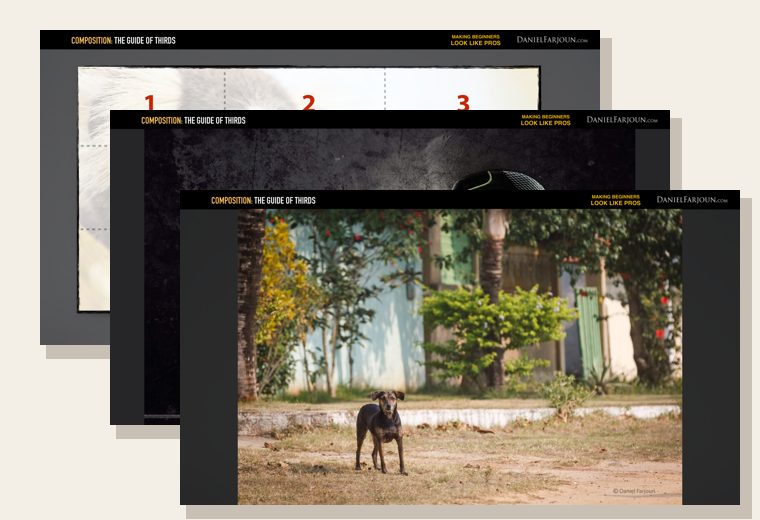
The Guide of Thirds, Negative Space and Balance: 40 illustrated pages from Photographic Composition. Free, straight to your inbox.
Practise here. Be ready out there.
5 days free · no credit card · then €97 once
€97 once · no subscription · every update included · plus VAT where it applies
Already have it? Open Camera Playground
