

If you’re here, you’ve probably seen Blackmagic’s new microphone, read “108 microphones, 64 channels, 7th order Ambisonics” and wondered what that actually means, whether it’s an Apple product, and what you’d do with files that big. In this post I’ll go through what Blackmagic has announced so far, what 7th order means in plain terms, where Apple comes in, and how I opened, played and shrank Blackmagic’s own 7th-order sample file in my browser with two of my Spadio apps. It takes about ten minutes to read.
Know what you’re getting: 7th order means 64 channels of sound field.
Hear a real 7th-order file on headphones, before the mic ships.
Shrink it for the web, or convert it to the format your project needs.
Spadio Ambix Compressor and Spadio Hub both handle 7th-order files now. They run in your web browser on a computer, and your audio stays on your machine.
What Blackmagic has announced
Blackmagic Design calls it “the world’s first 7th order ambisonic microphone”. Here is what its product page says, and what it doesn’t say yet:
| What | Blackmagic’s product page |
|---|---|
| Capsules | 108 MEMS microphones |
| Format | 7th-order Ambisonics, 64 channels, 32-bit audio |
| Encoding | A built-in spatial encoder, so the mic itself outputs Ambisonics |
| Connection | A single USB-C cable |
| Body and accessories | Rugged aluminum, a mount, and a kit version with a windshield and a locking USB-C cable |
| Software named | DaVinci Resolve Studio and Fairlight |
| Availability | “Coming in December 2026” |
| Sample | A downloadable 7th-order ambisonic audio file (.caf) |
| Not on the page yet | Sample rate, self-noise, frequency response and a full spec sheet |
I downloaded the sample. It’s a 104-second CAF file with 64 channels of 24-bit audio at 48 kHz, 958 MB on disk, tagged with the AmbiX channel layout (ACN order, SN3D normalization). The page talks about 32-bit audio; the sample file itself is 24-bit.
What is 7th-order Ambisonics?
Ambisonics doesn’t record speaker channels like stereo or 5.1. It records the sound field around the microphone, so you can turn it later to follow a viewer’s head and play it back on headphones or on any speaker layout. The order says how much spatial detail the file carries, and order N needs (N+1)² channels:
| Order | Channels | Size per minute* | What you hear |
|---|---|---|---|
| 1st | 4 | about 35 MB | Spacious, but directions are fairly blurred |
| 3rd | 16 | about 138 MB | Clearly placed sources |
| 5th | 36 | about 311 MB | Sharper still |
| 7th | 64 | about 553 MB | Very precise placement, stable as you turn your head |
*Uncompressed WAV or CAF at 48 kHz and 24-bit.
Higher orders mostly pay off when you move: turn your head in a headset and a voice stays where it is, as a point rather than a cloud. The first 4 channels of a 7th-order file are a complete 1st-order file, and the first 16 are a complete 3rd-order file, so you can always go down in order, never up.
Is it an Apple microphone?
No, it’s a Blackmagic Design product, but Apple is clearly part of the story. On Blackmagic’s own page, Apple appears next to the microphone on the card for the URSA Cine Immersive, Blackmagic’s camera “designed specifically to capture Apple Immersive Video for Apple Vision Pro”.
Hugh Hou, who tried the mic in person at an Apple immersive event, adds more in the description of his hands-on video (published 12 November 2026). According to him:
- the mic is built with Apple-licensed array geometry and encoding filters;
- mounted on the URSA Cine Immersive, it records spatial audio straight into the camera’s BRAW immersive file, in sync, with no separate recorder or timecode;
- it also works with Fairlight on a computer and with an iPhone through the Blackmagic Camera app;
- delivery is as Apple Spatial Audio Format (ASAF) through Fairlight in DaVinci Resolve;
- one USB-C cable carries audio and power, and it’s class compliant, with no drivers.
He also lists what isn’t known yet: sample rate, self-noise, handling noise and wind performance. Until the mic ships and gets tested, treat those as open questions.
Ambisonics vs Dolby Atmos: which is this?
This mic records Ambisonics, a scene-based format: the whole sound field in a fixed set of channels. Dolby Atmos is object-based: separate sounds with position data, rendered for each playback system. They’re often used together. You record the space in Ambisonics and place dialogue or effects as objects on top. Both can be played on headphones as binaural audio.
How to play a 7th-order .caf file
CAF (Core Audio Format) is Apple’s container, and it’s what Blackmagic’s sample comes in. Most players can open a CAF, but a 64-channel Ambisonics file needs an Ambisonic decoder to sound like a 3D space on headphones. Without one you’re just hearing raw channels. That’s the job of Spadio Hub, further down. First, the size problem.
Make 7th-order files small enough for the web: Spadio Ambix Compressor
At more than half a gigabyte per minute, 7th-order audio is fine on a workstation and far too heavy for a web page, a WebXR scene or a mobile headset. Spadio Ambix Compressor opens AmbiX WAV, RF64 and CAF files up to 7th order (64 channels) and encodes them into Opus Ambisonics (.ogg), an efficient, open format built for streaming, at any target order from 1st to 7th. That makes it a good fit for web and WebXR immersive experiences and other online delivery. It runs fully in your browser. The page needs the internet the first time to load the encoder, but your audio isn’t uploaded.
1. Load the file
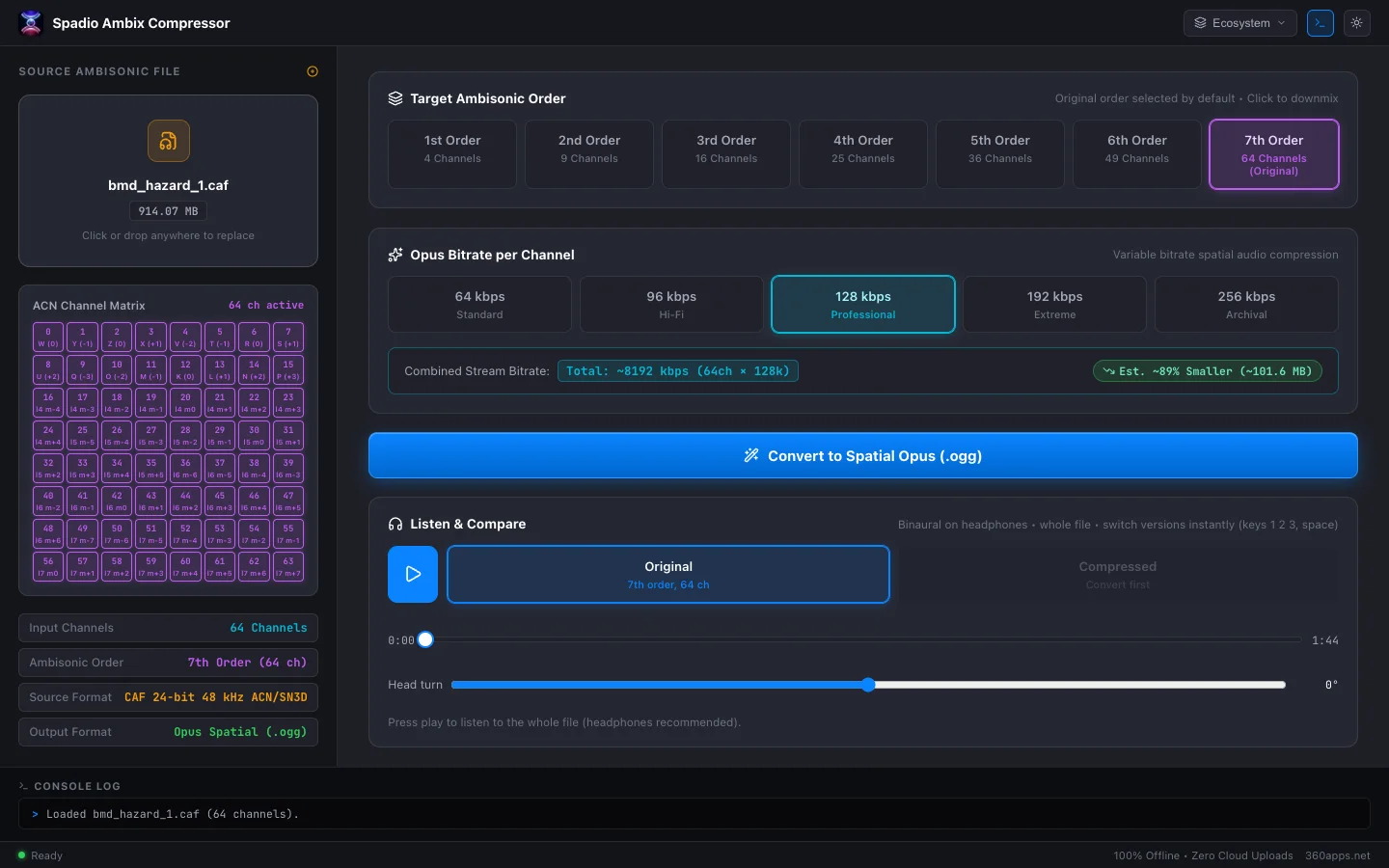
Drop the CAF, WAV or RF64 file on the window. The ACN Channel Matrix lights up all 64 channels, and the sidebar shows what it found. For Blackmagic’s sample: 64 channels, 7th order, CAF 24-bit 48 kHz ACN/SN3D.
2. Pick the order and bitrate
Keep 7th Order to keep all the detail, or choose a lower order to keep only the first 4 to 49 channels. Then pick the Opus bitrate per channel:
| Bitrate per channel | Label in the app | When I use it |
|---|---|---|
| 64 kbps | Standard | Previews and mobile, where size matters most |
| 96 kbps | Hi-Fi | Ambiences on the web |
| 128 kbps | Professional (default) | Most delivery; what I used for the test below |
| 192 / 256 kbps | Extreme / Archival | Detailed material, or when you’ll process it again |
3. Convert, then listen before you save
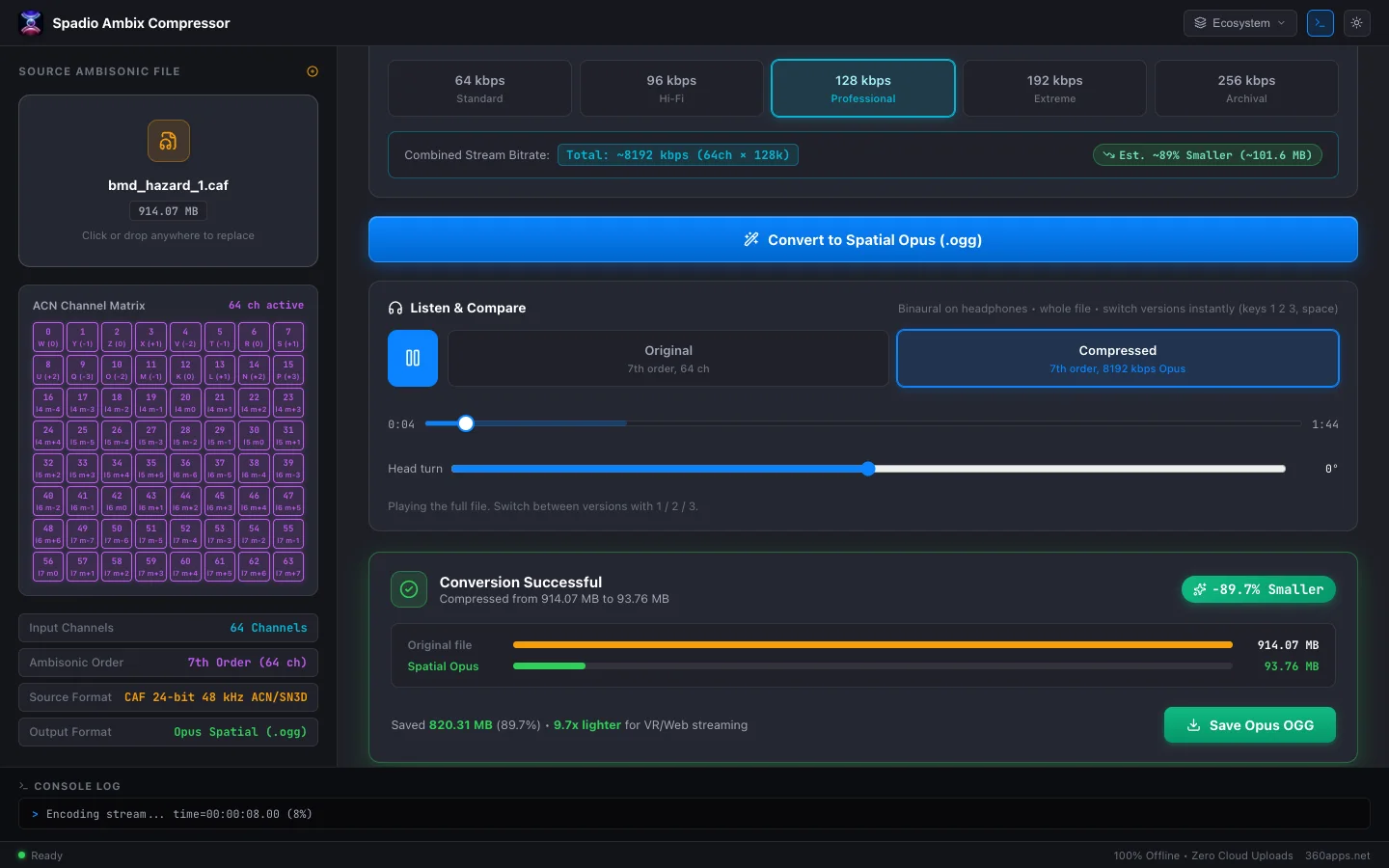
Click Convert to Spatial Opus (.ogg). With Blackmagic’s full sample at 128 kbps per channel, the app reported 89.7% smaller, 9.7 times lighter, in about half a minute on my Mac: 958 MB became about 98 MB. (The app counts in binary megabytes, so it shows the same files as 914 MB and 94 MB.)
Before saving, put on headphones and use Listen & Compare. It plays the whole file binaurally and switches instantly, with the keys 1, 2 and 3, between the original, the original reduced to your target order (still uncompressed) and the compressed version. All three are level-matched, so a louder version never fools you into preferring it, and you can hear what the order change does and what the codec does, separately. A head-turn slider lets you check that the sound field still rotates cleanly.
Open, hear and convert the files: Spadio Hub
Spadio Hub is the spatial audio player and converter in the same suite. It opens Ambisonics up to 7th order as WAV, CAF or Ogg Opus, including the Compressor’s output, so you can play Blackmagic’s original sample and the compressed .ogg you just made, side by side.
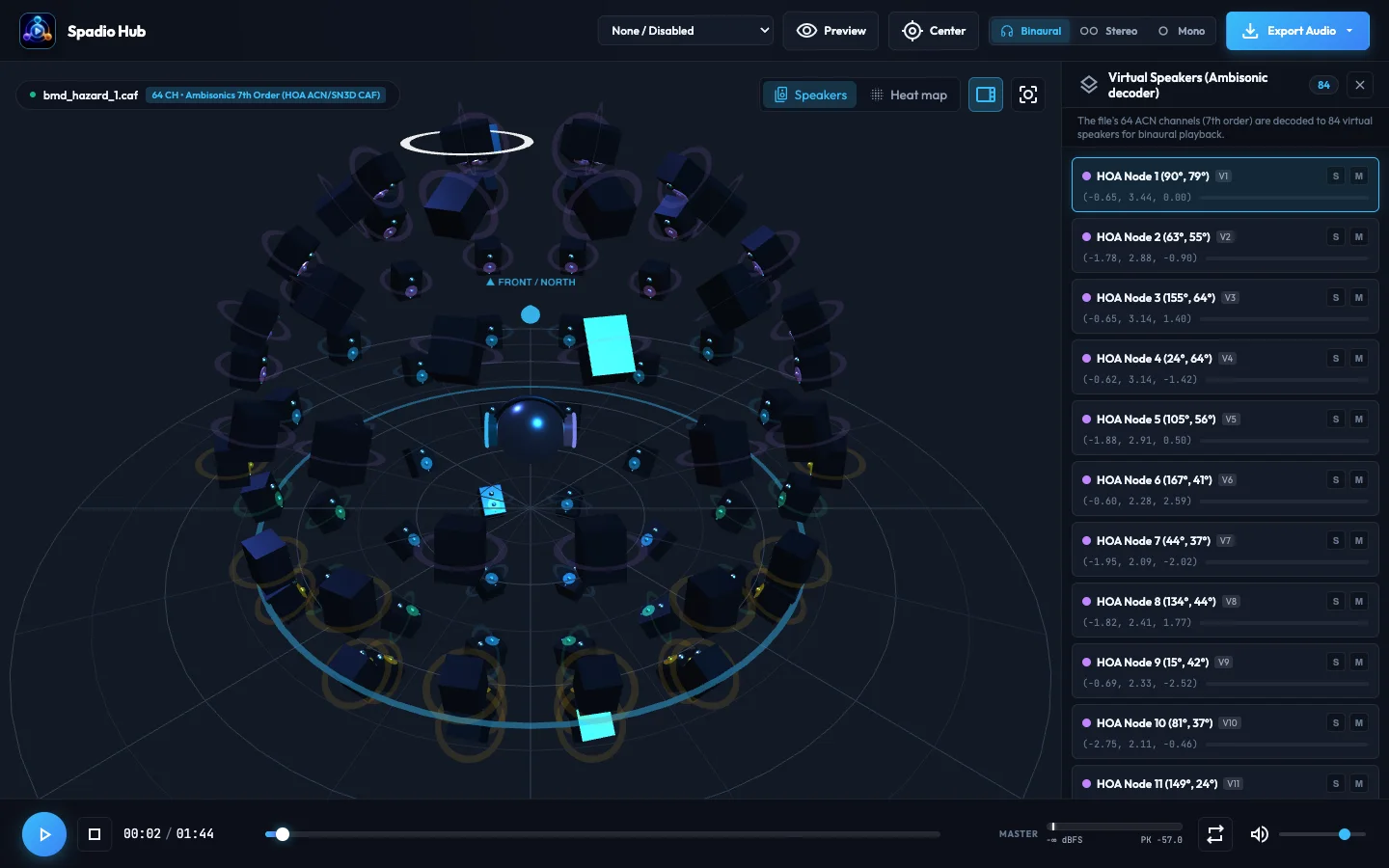
Headphones only have two channels, so Hub spreads the 64 Ambisonic channels over 84 evenly spaced virtual speakers around your head and renders each one through a head-related filter (HRTF). Why 84? A 7th-order sound field needs at least 64 speakers to keep all of its detail, and a few extra let them sit evenly, so every direction is reproduced equally sharp. It can follow your head, too: pick webcam tracking in the browser, or Sony and Bose headphones with head tracking (AirPods work in the macOS app).
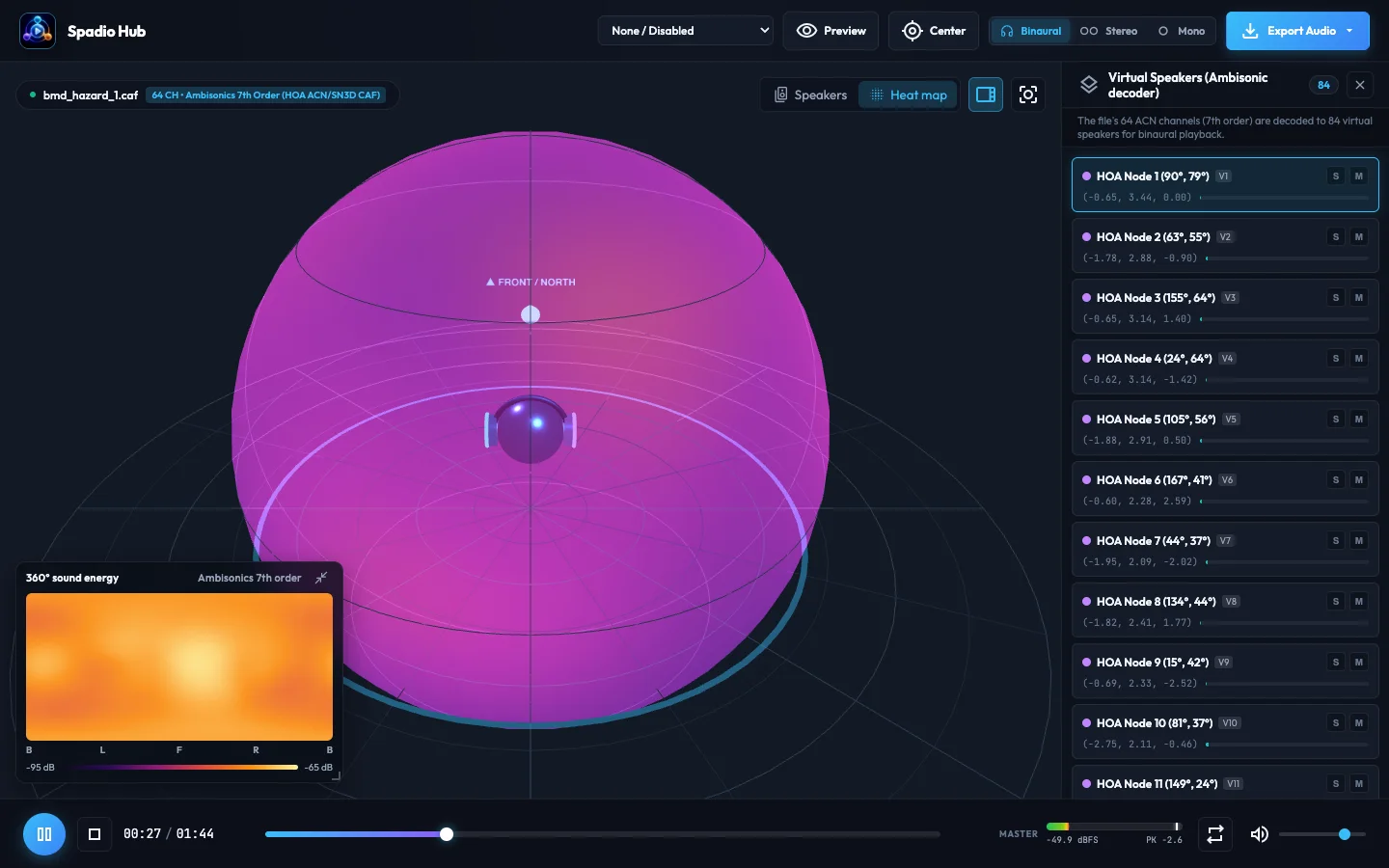
Switch to Heat map to see where the sound energy comes from: a glowing sphere around the listener plus a flat 360° map, which makes it easy to spot where the loud events are in a recording before you edit it.
Then use Export Audio to turn the recording into what your project needs:
| Export | Why you’d want it |
|---|---|
| Ambisonics 1st to 7th order (AmbiX, 24-bit WAV) | Lower the order for tools that only take 1st or 3rd order, such as YouTube 360 (1st order) |
| Binaural 3D (HRTF) | A normal stereo WAV that sounds 3D on any headphones |
| Stereo downmix | Speakers, phones and social video |
| Mono sum | A quick reference or a single-speaker check |
| Dolby Atmos ADM BWF | A master for DAWs and Atmos workflows |
If something goes wrong
| What you see or hear | What to change |
|---|---|
| The file plays but doesn’t sound 3D | You’re hearing raw channels. Open it in an Ambisonic player such as Spadio Hub and use headphones. |
| Left and right or front and back seem swapped | Check that the file is AmbiX (ACN/SN3D) and that the player expects AmbiX, not the older FuMa convention. |
| The compressed file is still too big | Lower the bitrate per channel, or lower the order to 3rd (16 channels). |
| Artifacts in quiet, detailed passages | Raise the bitrate per channel and compare again in Listen & Compare. |
| YouTube plays your 360 video in plain stereo | YouTube needs 1st-order AmbiX inside the video file with spatial audio metadata, not a 7th-order or Opus file. |
| The browser runs out of memory | Very long 64-channel files are heavy. Close other tabs or split the recording into shorter parts. |
Ideas to try
- Download Blackmagic’s sample and compare 1st, 3rd and 7th order on headphones, to decide what your project really needs.
- Turn a 7th-order ambience into a light Opus file for a WebXR scene or a 360 web experience.
- Export a 1st-order AmbiX version of the same recording for YouTube 360.
- Make a binaural stereo version for a podcast or a social video, so everyone with headphones hears the space.
- Use the heat map to find where the action is in a long field recording before you edit.
What we don’t know yet
The microphone isn’t shipping yet and Blackmagic hasn’t published a full spec sheet, so sound quality, self-noise, wind handling and the final workflow details may change or turn out differently in real tests. Everything above about the mic comes from Blackmagic’s product page and Hugh Hou’s hands-on video, and everything about the files comes from Blackmagic’s sample. I’ll update this post when the mic is out.
Questions
What is the Blackmagic Ambisonic Microphone?
A spatial audio microphone from Blackmagic Design. Blackmagic describes it as the world's first 7th order ambisonic microphone, with 108 MEMS microphones and a built-in spatial encoder, sending 64 channels of 32-bit audio over a single USB-C cable.
What is 7th-order Ambisonics?
Ambisonics stores a sound field as channels; order N needs (N+1) squared channels. 7th order is 64 channels, against 4 for the first-order format most ambisonic microphones record, so sounds are placed much more precisely around the listener.
Is the Blackmagic Ambisonic Microphone made by Apple?
No, it's a Blackmagic Design product. Blackmagic ties Apple to its URSA Cine Immersive camera, which is designed for Apple Immersive Video on Apple Vision Pro. In his hands-on video, Hugh Hou says the mic uses Apple-licensed array geometry and encoding filters and delivers Apple Spatial Audio Format through Fairlight in DaVinci Resolve.
When is the Blackmagic Ambisonic Microphone available?
Blackmagic's product page says it is coming in December 2026. The full technical specifications were not published on the page when this post was written.
Does it work with an iPhone?
According to Hugh Hou's hands-on video, yes: it records on iPhone through the Blackmagic Camera app over USB-C. Blackmagic's own page doesn't list iPhone support yet.
How big are 7th-order Ambisonics files?
About 550 MB per minute at 48 kHz and 24-bit, the format of Blackmagic's sample file: its 104-second recording is 958 MB. Compressed to Opus at 128 kbps per channel it became about 98 MB, 89.7% smaller.
How do I play a 7th-order .caf file?
You need a player with an Ambisonic decoder to hear it as a 3D sound field on headphones. Spadio Hub opens 64-channel CAF, WAV and Ogg Opus files in the browser and decodes them to binaural.
Can I upload 7th-order Ambisonics to YouTube?
No. YouTube 360 uses first-order Ambisonics (4 channels). Spadio Hub can export a first-order AmbiX file from a 7th-order recording for that.
Sources
- Blackmagic Ambisonic, Blackmagic Design product page (product claims, availability and the 7th-order sample file)
- Hugh Hou, “Blackmagic Ambisonic Microphone: 108 Mics, 7th Order Spatial Audio for Apple Immersive”, YouTube, 12 November 2026 (video description)