

If you’re here, you’ve probably heard a spatial audio or 8D track and wondered how to do that with your own favourite song, then found that every “spatial audio converter” either just swings the whole song from ear to ear or doesn’t change much at all. In this post I’ll show you the way that actually works: split the song into stems (vocals, drums, bass and the rest) with a stem splitter you may already have, then place each stem around your head in my app Spadio3D, add a room, and export a 3D file that plays on any headphones. It takes about 20 minutes the first time.
Split the song into stems with Moises, Logic, BandLab or a free tool.
Drop the stems into Spadio3D and place each one around your head.
Add a room, listen in binaural, and export a 3D WAV.
Spadio3D runs in your web browser on a computer (there’s also a Mac app), and your audio stays on your machine. You need a stem splitter for step 1; Spadio3D doesn’t split songs itself.
Why a “spatial audio converter” can’t do it for you
A normal song is two channels, left and right. Everything is already mixed together in them: the voice, the drums, the reverb. A one-click converter can only treat that mix as one thing, so you usually get one of two results:
- 8D audio: the whole song swings in a circle around your head. It’s fun for a minute, but the voice and the drums move together, so nothing feels like it’s really in a place.
- Widening: the song sounds a bit bigger, but still sits between your ears.
Real spatial audio, like the mixes you hear on streaming services, places each part of the song in its own spot: the singer in front of you, the drums behind, a guitar on your left. To do that with a finished song, you first have to take it apart. That’s what a stem splitter does.
Step 1: Split the song into stems
A stem splitter uses AI to separate a finished song into parts. You may already have one: they’re built into several music apps now. These are the best-known ones:
| Stem splitter | Where it runs | Stems | Good to know |
|---|---|---|---|
| Moises | Web, desktop, iPhone, iPad, Android | Vocals, drums, bass and many more on paid plans | The easiest start on a phone. Has a free plan with a limited number of songs a month. |
| Logic Pro Stem Splitter | Mac and iPad with Apple silicon | Vocals, drums (individual kit pieces), bass, guitar, piano, other | Built into Logic Pro since version 11.2. Logic Pro 13 added individual drum kit pieces) + Vocal, Bass, Guitar, Piano, Other. |
| Ableton Live Stem Separation | Windows, Mac | Vocals, drums, bass, other | Built into Live 12.3 Suite. Runs on your computer, no internet needed. |
| FL Studio Stem Separation | Windows, Mac | Vocals, drums, bass, instruments | Built into FL Studio Producer Edition and up. |
| BandLab Splitter | Browser, BandLab app | Vocals, drums, bass, other | Free with a BandLab account. |
| LALAL.AI | Browser, desktop | Vocals, drums, bass, guitar, piano and more | The free plan lets you preview stems; downloading the full stems needs a paid plan. |
| iZotope RX (Music Rebalance) | Windows, Mac | Voice, bass, percussion, other | A pro audio repair suite, if you already own it. |
| Ultimate Vocal Remover (UVR) | Windows, Mac, Linux | Depends on the model; Demucs gives 4 or 6 stems | Free and open source, runs on your computer. Less polished, more settings. |
Whichever you use, export the stems as WAV files, all from the very start of the song, so they stay in sync when you load them together. Most splitters do this by default.
Step 2: Drop the stems into Spadio3D
Open Spadio3D and click Start New Project. In the left panel there’s a box that says Drag MP3/WAV files here or Click to select. Select all your stems at once and drop them in. Each stem becomes a track in the list and a coloured sphere around the head in the middle of the room. You can also simply select your files in Finder and drag onto Spadio window.
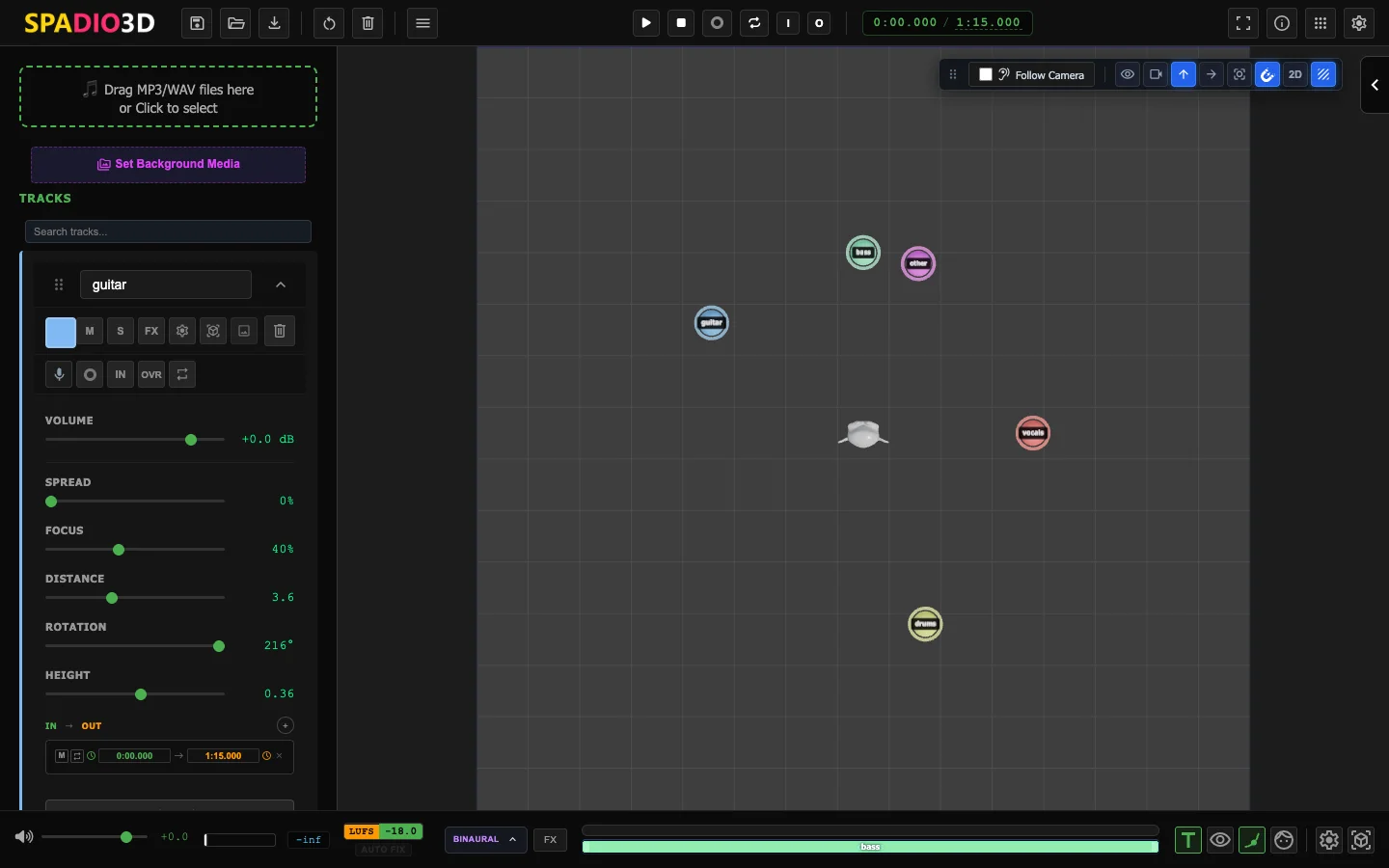
The head is you, the listener, looking up the screen. Press the spacebar to play. Everything is now coming from a direction, but not yet from the right one.
Step 3: Place each stem around your head
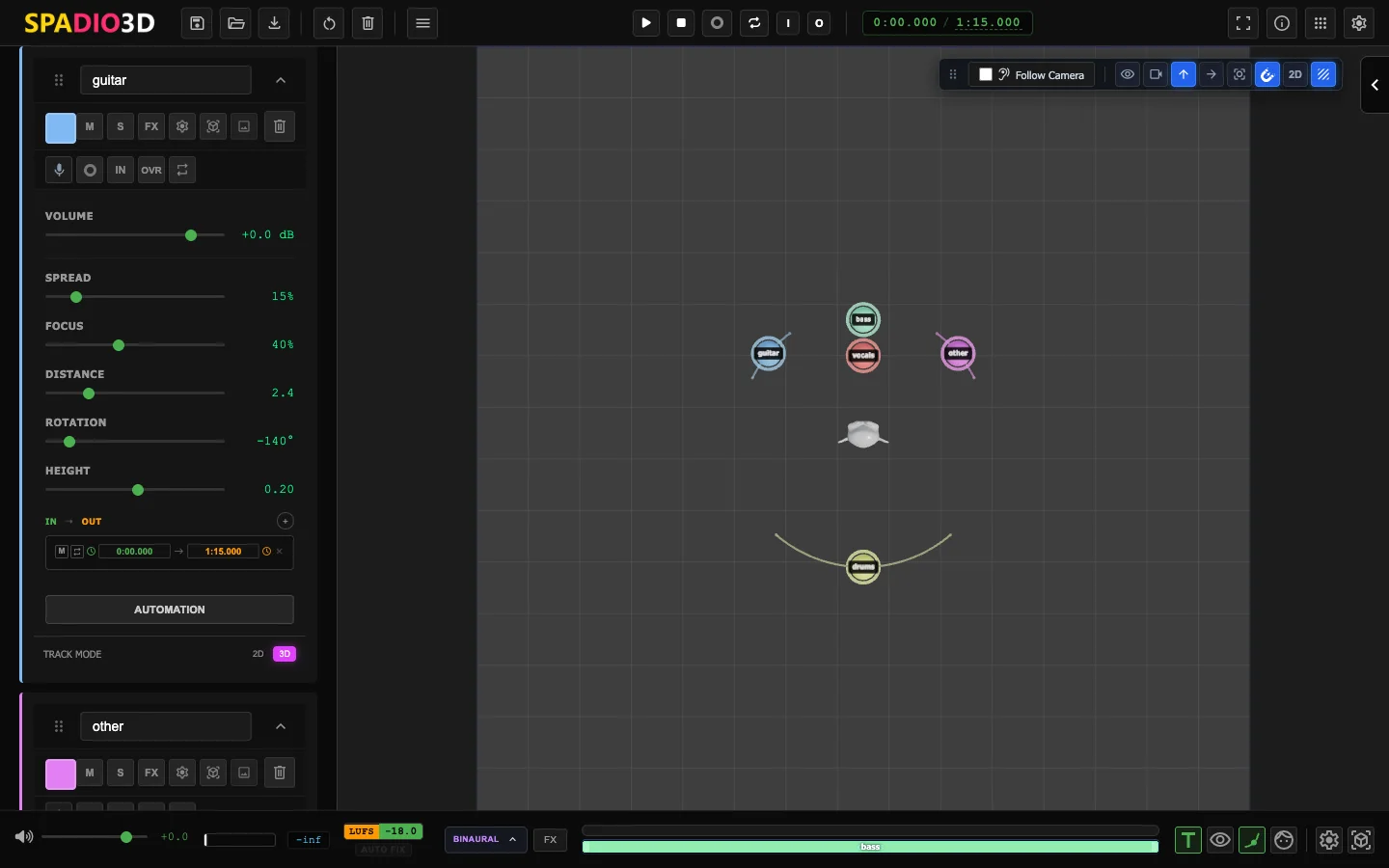
You can drag the spheres in the 3D view, or open a track in the left panel and use its sliders: Rotation (the direction), Distance, Height and Spread (how wide the sound is). The Top View button in the toolbar above the 3D view makes placing easier. This layout is a good start for a pop or rock song:
| Stem | Rotation | Distance | Height | Spread | Why |
|---|---|---|---|---|---|
| Vocals | -90° (front) | 1.5 | 0.1 | 0% | The voice in front and close, like a singer facing you. |
| Bass | -90° (front) | 2.2 | -0.6 | 0% | Low and centred, so the song keeps its weight. |
| Guitar | -140° (front left) | 2.4 | 0.2 | 15% | Off to one side, so it doesn’t sit on top of the voice. |
| Other (keys, horns, synths) | -40° (front right) | 2.4 | 0.5 | 15% | Balances the guitar on the other side. |
| Drums | 90° (behind) | 2.6 | 0.3 | 45% | Wide and behind you: the “inside the band” feeling. |
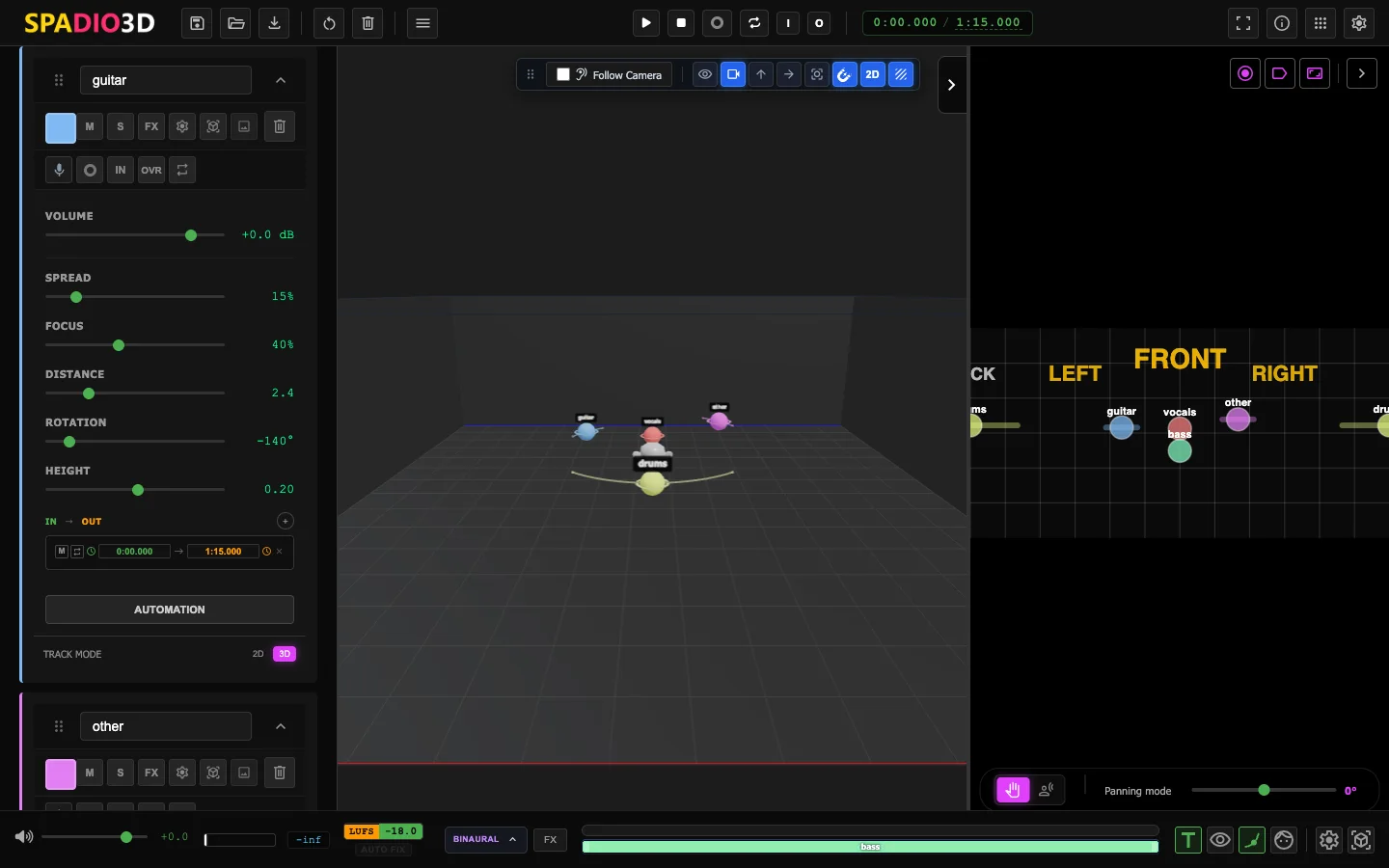
The 2D button opens a 360° panorama with FRONT, LEFT, RIGHT and BACK marked on it, which is a quick way to check the layout as you’d hear it.
Step 4: Add a room
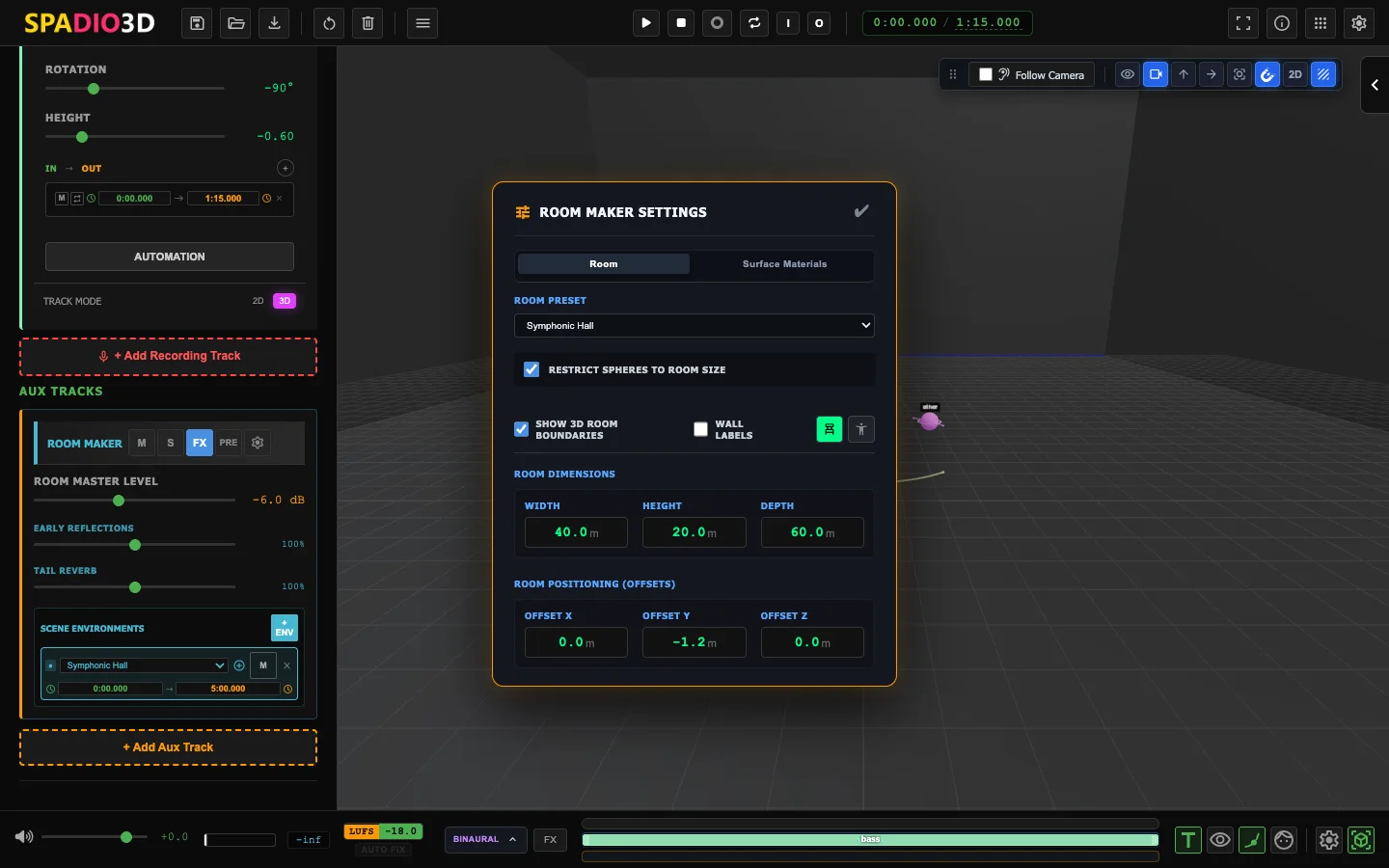
Sounds without a room feel like they’re inside your head. A little reverb puts them out in a space. Click Toggle Room Maker for All Tracks in the bottom bar to send every stem to the room, then Room Maker Settings next to it to pick a Room Preset: from Small Vocal Booth and Studio Control Room up to Medium Church, Large Cathedral and Symphonic Hall.
| Room preset | Sounds like | Use it for |
|---|---|---|
| Studio Control Room | A small, dry room | Pop, hip-hop, podcasts: close and clear |
| Medium Church | A big room with a long tail | Ballads, choirs, acoustic songs |
| Symphonic Hall | A concert hall | Orchestral, live-feeling, cinematic mixes |
Step 5: Listen in binaural and export
Put on headphones. The button in the bottom bar should say BINAURAL; clicking it switches between Binaural, Stereo and Mono. Play the song, close your eyes and adjust until the voice feels in front of you and the drums behind.
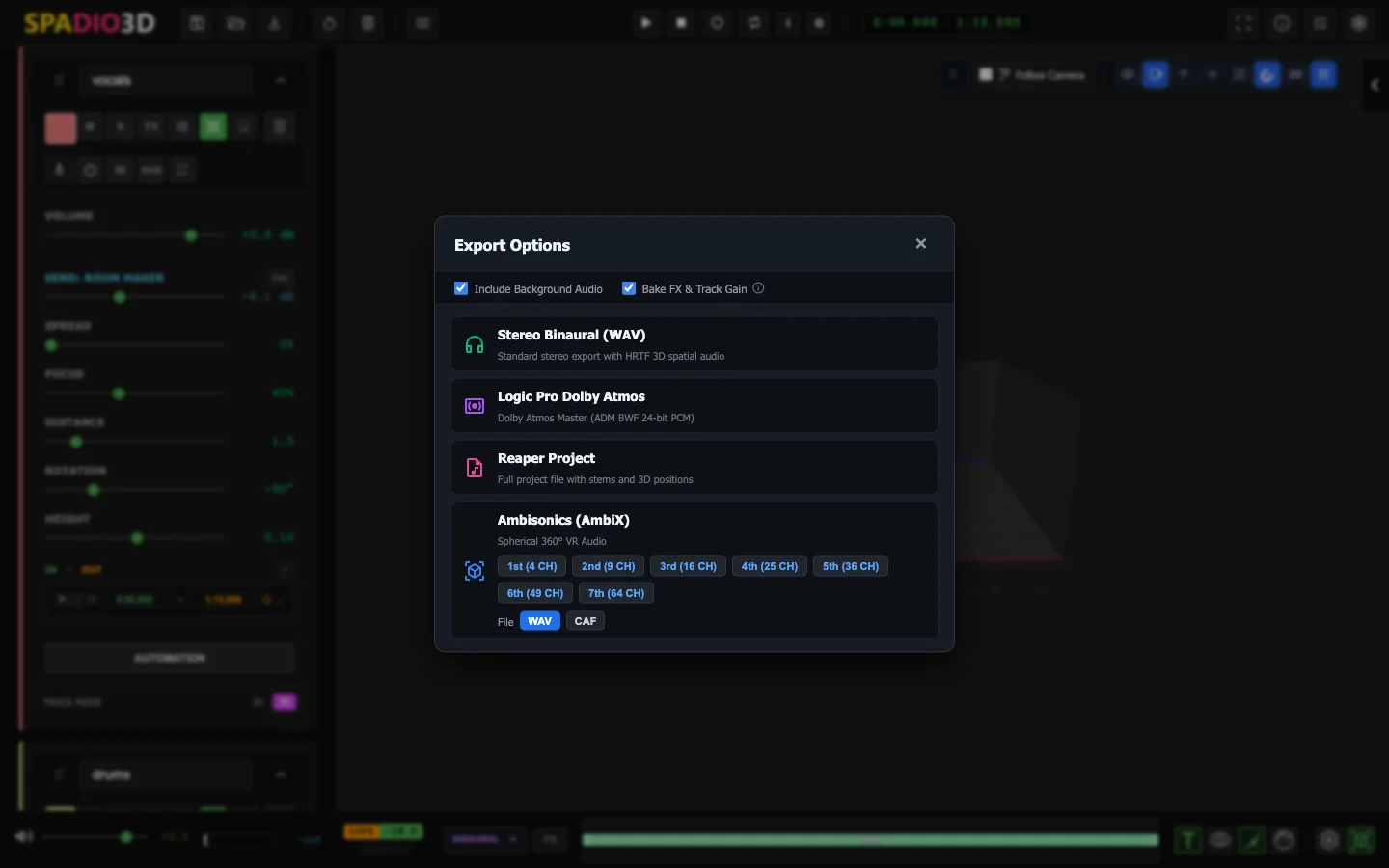
When you’re happy, click Export Audio in the top bar:
- Stereo Binaural (WAV) is the one you want for headphones. You get a 2-channel, 48 kHz, 24-bit WAV the same length as the stems. It plays in 3D on any headphones and in any player.
- Ambisonics (AmbiX), from 1st order (4 channels) to 7th order (64 channels), WAV or CAF, is for 360° video and spatial players that read Ambisonics. The 1st-order export comes as a .zip with the 4-channel WAV and a metadata file.
- Logic Pro Dolby Atmos (ADM BWF) and Reaper Project are there if you want to keep working on the mix in a DAW.
Want the 8D effect too?
You can have both. Open a track, click AUTOMATION, and under Motion Clips click + PRESET: it adds a Circular Orbit, and the stem starts circling around you. Other presets include Arc Sweep, Pendulum, Figure 8, Spiral and Helical Rise. Try it on one stem, say a synth or a backing vocal, and keep the voice and drums still. It sounds far more natural than spinning the whole song.
Troubleshooting
| What you see or hear | What to change |
|---|---|
| Everything sounds in the middle of my head | Move some stems to the left and right, not only front and back, and turn on Room Maker. |
| The exported file sounds flat or mono | The bottom button was on MONO or STEREO. Set it to BINAURAL and export again. |
| The stems are out of sync | Export all stems from the start of the song in your stem splitter, and load them together. |
| The voice has bits of drums or reverb in it | Try another splitter or a higher-quality model; keep the vocal in front so leftovers blend in. |
| The front sounds like it’s behind me | Some ears mix up front and back in binaural audio. Make the difference bigger: vocals closer in front, drums further behind, and turn on Room Maker. |
| My phone makes it sound strange | Turn off the phone’s own spatial audio or head tracking while you play the binaural WAV. |
Ideas to try
- Your own band’s rehearsal recording, with each player where they really stood.
- A song for a walk or a run, with the backing vocals slowly circling you.
- A meditation or sleep track where the pad sits above you and the voice close in front.
- A 360° video soundtrack, exported as Ambisonics for YouTube.
- A “concert seat” version: the whole band in front of you and Symphonic Hall as the room.
Honest caveats
- Rights: a 3D version of someone else’s song is still their song. Keep it for your own listening, or use music you own or have licensed before you share or upload it.
- Separation isn’t perfect: stem splitters are very good now, but busy mixes can leave traces of one instrument in another stem.
- Spadio3D doesn’t split stems. You need one of the splitters above for step 1.
Questions
Is there a spatial audio converter that turns any song 3D in one click?
Not one that really places the instruments. A stereo file only has a left and a right channel, so a converter can’t know where the singer or the drums should go. One-click tools either rotate the whole song (8D) or add a general widening. To make a song truly 3D, split it into stems first, then place each stem around the listener.
What is the difference between 8D audio and spatial audio?
8D audio moves the whole stereo song in a circle around your head, usually with added reverb. Spatial audio places each part of the song in its own spot: the voice in front, the drums behind, guitars to the sides. You can do both in Spadio3D; the circle is one Motion Clip preset (Circular Orbit).
What is the best free stem splitter?
Ultimate Vocal Remover is free and open source for Windows, macOS and Linux, and runs on your own computer. BandLab Splitter is free in the browser and the BandLab app, and Moises has a free plan. If you already own Logic Pro, Ableton Live 12.3 Suite or FL Studio Producer Edition, their built-in stem splitters are a good choice too.
Do I need special headphones for 3D audio?
No. A binaural WAV works on any ordinary headphones or earbuds. Turn off your phone’s or player’s own spatial audio and head tracking while you listen, so it doesn’t process the file a second time.
How many stems should I split a song into?
Four stems (vocals, drums, bass, other) already work. Five or six (adding guitar and piano, as Logic Pro and some other tools can) give you more to place, and the mix feels wider when instruments sit on different sides.
Can I make a 3D version of a famous song and upload it?
Making a version for your own listening is one thing. Uploading or selling a 3D version of a song you don’t own the rights to is not allowed without the rights holder’s permission. Use your own music, music you’ve licensed, or keep the result private.
Can I play the result in a spatial audio player?
The binaural WAV plays in any player. The Ambisonics export (AmbiX WAV, from 1st to 7th order) is for players and platforms that read Ambisonics, such as 360° video on YouTube, or Spadio Hub, which plays Ambisonics files on headphones in binaural.